
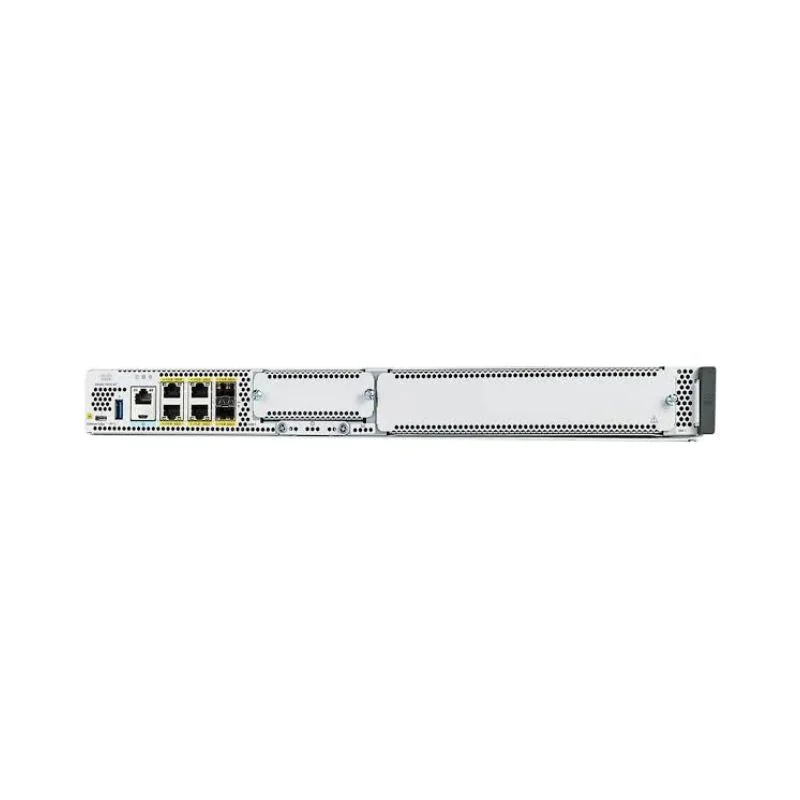
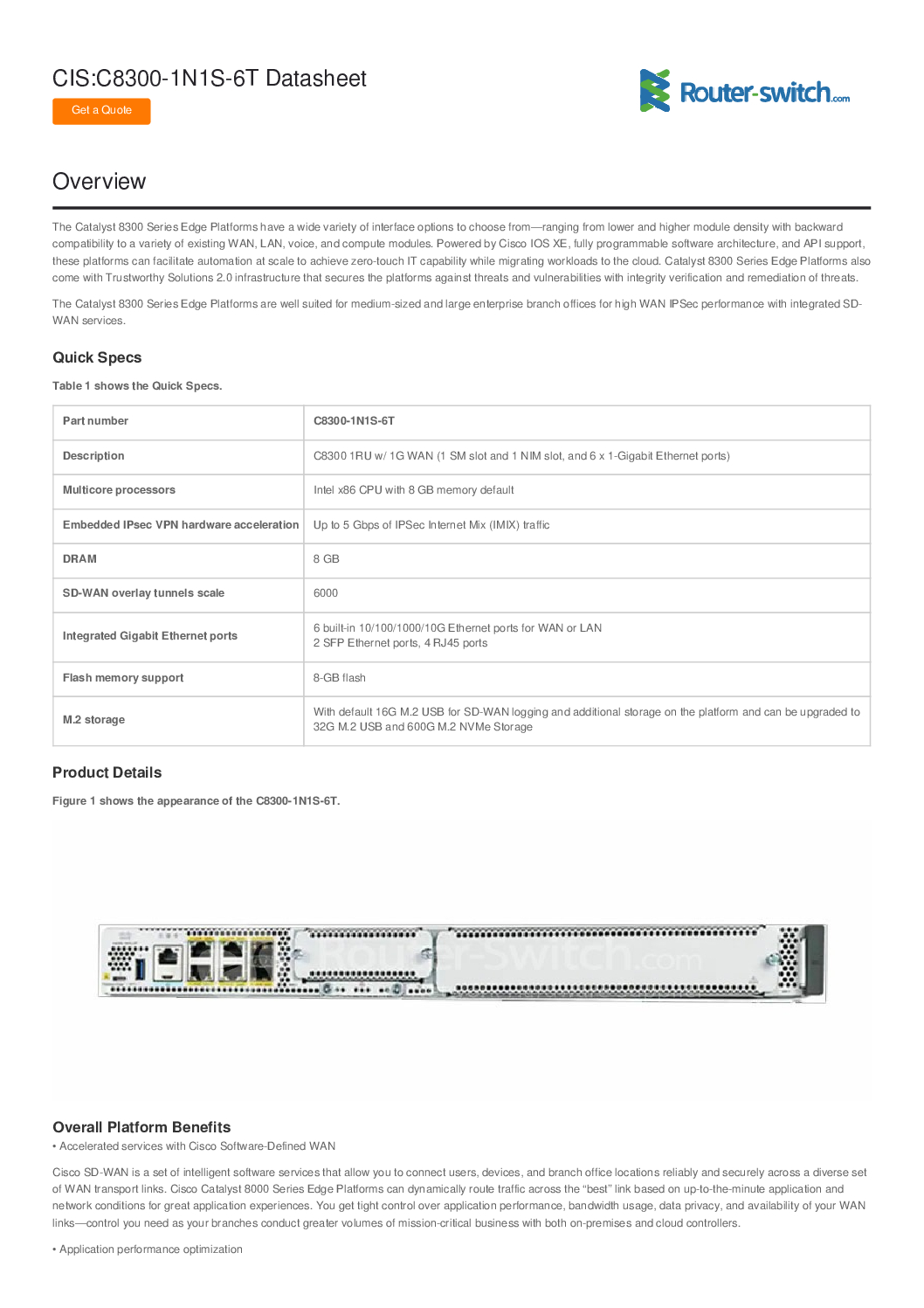
Cisco C8300-1N1S-6T – High-Performance Enterprise Edge Router
Product Overview
The Cisco C8300-1N1S-6T is a modular enterprise-class edge router designed for branch offices, enterprise networks, and secure cloud connectivity. Part of the Cisco 8300 Series Edge Platforms, it provides a high-performance WAN edge solution with advanced routing, security, and scalability.
With one network interface module (NIM) slot, one service module (SM) slot, and six Gigabit Ethernet ports, this router is ideal for organizations requiring high throughput, reliable connectivity, and flexibility for future upgrades.
Powered by Cisco IOS XE, it supports programmable software architecture, advanced automation, and SD-WAN capabilities, enabling zero-touch provisioning, policy-based routing, and secure WAN connections.
This router is built to handle voice, video, and data traffic simultaneously, making it suitable for modern enterprise environments with high network demands.
Hardware Specifications
| Feature | Specification |
|---|---|
| Model | C8300-1N1S-6T |
| Network Interfaces | 6 × 10/100/1000 Gigabit Ethernet RJ45 ports |
| NIM Slot | 1 Modular Network Interface slot |
| SM Slot | 1 Service Module slot |
| Switching Capacity | Up to 10 Gbps (dependent on configuration) |
| Forwarding Rate | Approx. 6 Mpps |
| WAN Interface Support | Modular, supports 1G/10G SFP modules |
| Stackable | Not stackable; designed as standalone WAN edge device |
| Redundancy | Dual PSU optional (depends on chassis configuration) |
| Dimensions (W×D×H) | 44.5 × 40 × 4.45 cm (1U rack-mountable) |
| Operating Temperature | 0°C ~ 45°C |
| Fan | Variable-speed fans |
| LED Indicators | System, port, module status |
Key Features and Capabilities
1. High-Performance Routing
6 Gigabit Ethernet ports provide high-speed LAN connectivity.
NIM slot allows WAN expansion modules (e.g., 1G/10G SFP, DSL, or fiber modules).
Service module slot supports additional services such as firewall, LTE, or VPN acceleration.
Capable of routing multiple traffic types simultaneously, including voice, video, and data.
2. WAN Edge and SD-WAN Capabilities
Supports policy-based routing, dynamic routing protocols (OSPF, BGP, EIGRP).
SD-WAN ready with centralized management, application-aware routing, and security policies.
Enables secure cloud connectivity, including Internet breakout and VPN tunnels.
Optimized for high availability and reliability in branch deployments.
3. Security Features
Supports stateful firewall capabilities, integrated IPS/IDS when configured with modules.
Role-based access control for management interfaces.
Supports MAC address filtering, DHCP snooping, and ACLs to secure network traffic.
Advanced VPN options for secure branch-to-branch and cloud connectivity.
4. Automation and Programmability
Powered by Cisco IOS XE, allowing programmatic control, automation, and telemetry.
REST API and NETCONF/YANG support for configuration automation.
Enables zero-touch provisioning for quick deployment.
Real-time telemetry streams for proactive network monitoring.
5. Redundancy and High Availability
Optional dual PSU for power redundancy.
NIM and SM slots allow modular upgrades without full router replacement.
Failover supported for WAN interfaces to maintain uninterrupted connectivity.
Variable-speed fans reduce operational noise while maintaining cooling efficiency.
Cisco C8300-1N1S-6T – High-Performance Enterprise Edge Router
Network Deployment Scenarios
1. Branch Office Deployment
Connects all branch office LAN devices: PCs, printers, IP phones, and APs.
WAN uplinks to corporate network or cloud services using modular NIM slot.
SD-WAN capabilities allow dynamic path selection for optimal performance.
PoE not included; devices powered separately.
2. Small to Medium Enterprise WAN Edge
Acts as a gateway to the internet and corporate WAN.
Supports multiple WAN connections for load balancing and failover.
Can host firewall or VPN modules in SM slot for enhanced security.
Ideal for enterprises requiring branch-to-cloud or branch-to-branch secure connectivity.
3. Cloud-Ready Deployments
Supports direct cloud internet breakouts.
Policy-based routing ensures traffic is directed optimally to SaaS applications.
SD-WAN integration allows centralized control, monitoring, and security policies.
Capable of segmenting traffic by application type, improving overall network performance.
Cisco C8300-1N1S-6T – High-Performance Enterprise Edge Router
Configuration and Management
1. Initial Setup
Rack-mount the router in a 1U slot.
Connect power and WAN interfaces.
Assign management IP addresses via console or web GUI.
Configure initial credentials and security policies.
2. WAN Interface Configuration
Insert NIM module for required WAN connectivity (fiber, Ethernet, or LTE).
Configure dynamic or static routing protocols.
Enable failover for backup WAN connections.
Monitor interface status and throughput.
3. LAN Interface Configuration
Assign IP addresses and VLANs to 6 LAN ports.
Connect LAN switches and access points.
Apply ACLs and QoS to prioritize critical applications like voice or video.
4. SD-WAN and Automation
Register device with Cisco vManage (if SD-WAN deployed).
Define traffic policies for SaaS and cloud applications.
Enable telemetry for real-time network performance monitoring.
Use REST APIs or NETCONF/YANG for automated configuration across multiple devices.
Cisco C8300-1N1S-6T – High-Performance Enterprise Edge Router
High Availability and Redundancy
Optional dual PSU ensures continuous operation during power failure.
Modular NIM and SM slots allow hot-swappable upgrades.
Redundant WAN paths ensure uninterrupted branch-to-branch or branch-to-cloud connectivity.
Failover configurations can prioritize backup links and optimize traffic routing.
Cisco C8300-1N1S-6T – High-Performance Enterprise Edge Router
Advanced Features
Routing Protocols
OSPF, EIGRP, BGP, and RIP support.
Policy-based routing for traffic optimization.
Firewall & VPN Support
Modular firewall in SM slot.
IPsec VPN tunnels for secure branch or cloud connections.
Quality of Service (QoS)
Prioritize voice, video, and mission-critical data.
Multiple egress queues per port.
Telemetry and Analytics
Streaming telemetry for proactive monitoring.
Real-time traffic analysis for bottleneck detection.
Modular Expansion
NIM and SM slots allow future-proofing for evolving network needs.
Add modules for LTE, additional WAN ports, or security functions.
Common Use Cases
Corporate Branch Office – LAN connectivity for workstations, phones, APs; secure WAN connection to HQ.
Small Enterprise WAN Edge – High-performance routing, firewall, VPN, and SD-WAN.
Cloud-First Deployment – Direct SaaS and cloud connectivity with policy-based routing.
Industrial Edge Router – IoT device connectivity with segmentation and secure remote management.
Maintenance and Troubleshooting
Regular Maintenance:
Monitor system logs and WAN/LAN interfaces.
Update IOS XE firmware periodically for security patches.
Check NIM and SM modules for proper operation.
Troubleshooting Scenarios:
| Issue | Resolution |
|---|---|
| WAN link down | Check NIM module, verify cable or SFP, failover to backup WAN |
| LAN port not working | Verify IP configuration, check VLAN assignment, test device on another port |
| SD-WAN traffic not routing | Verify vManage configuration, check policies and application classification |
| VPN tunnel not establishing | Verify peer IP, credentials, encryption settings, and firewall rules |
| Router overheating | Check fan operation, ensure proper rack airflow |
Cisco C8300-1N1S-6T – Advanced Enterprise Edge Router Deployment Guide
1. SD-WAN Deployment Setup
Step 1: Device Registration
Connect the router to the WAN and LAN.
Access the console and assign management IP addresses.
Register the device with Cisco vManage for centralized SD-WAN management.
Tips:
Ensure your vManage has the correct organization ID and device templates ready.
Use zero-touch provisioning for faster branch deployment.
Step 2: WAN Path Configuration
Configure primary WAN link using NIM slot module (e.g., 1G/10G SFP or DSL).
Set up backup WAN link to a secondary provider.
Apply policy-based routing for SaaS traffic prioritization.
Step 3: SD-WAN Policies
Define Application-Aware Routing (AAR) to prioritize critical traffic like VoIP and video.
Enable Dynamic Multipath Optimization (DMPO) to automatically select the best WAN path.
Create VPN overlays for secure branch-to-branch or branch-to-cloud communication.
2. Modular Slot Usage Examples
Network Interface Module (NIM)
Insert NIM for WAN connectivity (fiber, Ethernet, or DSL).
Supports hot-swappable installation for minimal downtime.
Future-proof: allows upgrades to higher-speed interfaces without replacing router.
Service Module (SM)
Install SM for firewall, VPN acceleration, or LTE backup.
SM modules expand router capability without adding new devices.
Provides centralized security at the WAN edge.
3. LAN and VLAN Deployment
Assign 6 LAN ports to different VLANs for segmentation.
Example VLAN Table:
| VLAN ID | Purpose | Devices Connected |
|---|---|---|
| 10 | Voice | IP Phones |
| 20 | Wireless | Access Points |
| 30 | Corporate LAN | Workstations, PCs |
| 40 | Guest / IoT | IoT devices, guests |
| 50 | Security | CCTV and surveillance |
Configuration Notes:
Use ACLs to restrict unauthorized access between VLANs.
Apply QoS policies to prioritize voice and video traffic.
4. WAN and Branch Deployment Diagram
Notes:
SD-WAN overlay ensures dynamic path selection.
Failover between primary and backup WAN links.
Modular slots allow future expansion without downtime.
5. QoS and Traffic Prioritization
Voice & Video: Highest priority, minimal latency.
Corporate Applications: Medium priority, guaranteed throughput.
Guest/IoT Traffic: Lowest priority, limited bandwidth.
Implementation:
Use 8 egress queues per port.
Configure DSCP marking for classification.
Apply policies globally or per interface.
6. Redundancy & High Availability
Dual WAN links for failover and load balancing.
Optional dual PSU for power redundancy.
Modular slots allow hot-swappable upgrades.
SD-WAN ensures automatic failover and traffic rerouting.
7. Troubleshooting Workflow
Common Scenarios:
| Issue | Steps to Resolve |
|---|---|
| WAN link down | Check NIM module, verify cable/SFP, failover to secondary link |
| LAN port not responding | Verify VLAN assignment, test with another device |
| VPN tunnel not establishing | Check credentials, peer IP, encryption, firewall rules |
| SD-WAN traffic misrouting | Verify vManage policies, check overlay tunnels |
| Router overheating | Inspect fans, ensure proper rack airflow |
Tip: Keep log files and telemetry data for proactive monitoring.
8. Branch, Campus, and Cloud Deployment Use Cases
Corporate Branch Office – Router acts as LAN gateway, provides secure WAN, optional firewall, and VPN.
Small Enterprise WAN Edge – Policy-based routing, SD-WAN optimization, modular NIM and SM expansions.
Cloud-First Deployment – Direct SaaS and cloud connectivity, QoS for latency-sensitive applications.
Industrial Edge – Connect IoT devices, sensors, and cameras with VLAN isolation and secure management.
9. Maintenance & Best Practices
Monitor system logs and interface statistics regularly.
Update IOS XE firmware to patch vulnerabilities.
Check NIM and SM modules for proper operation.
Verify WAN links, VLANs, and QoS configurations periodically.
Keep backup configurations for fast recovery.
Cisco C8300-1N1S-6T – Ultimate Enterprise Deployment & Operations Guide
1. Detailed SD-WAN Deployment
Scenario: Medium to large branch office requiring dynamic path selection, cloud connectivity, and secure traffic management.
Step 1: Zero-Touch Provisioning
Connect WAN and LAN interfaces.
Assign management IP addresses via console or GUI.
Register device in Cisco vManage for centralized SD-WAN management.
Apply device templates for branch office configuration.
Best Practices:
Ensure organization ID and policy templates are pre-configured in vManage.
Use zero-touch provisioning to avoid manual errors during mass deployments.
Step 2: WAN Path Configuration
Insert NIM module for WAN connectivity (fiber, Ethernet, LTE).
Configure primary and secondary WAN links for redundancy.
Apply policy-based routing for critical SaaS traffic (voice, video, ERP applications).
Example WAN Paths:
| Path | Type | Role |
|---|---|---|
| WAN1 | Fiber 1G | Primary, high-priority |
| WAN2 | LTE or backup | Failover |
| VPN Tunnel | Internet | Secure branch-to-branch or cloud connectivity |
Step 3: SD-WAN Policies
Application-Aware Routing (AAR): Prioritize business-critical applications.
Dynamic Multipath Optimization (DMPO): Automatically selects the best path based on latency, jitter, and packet loss.
Overlay VPNs: Secure communication between branches and HQ or cloud.
Tip: Use telemetry to monitor WAN performance in real-time for proactive optimization.
2. Modular Slot Usage – NIM & SM
Network Interface Module (NIM)
Adds WAN connectivity options: fiber, DSL, LTE, or Ethernet.
Hot-swappable for minimal downtime.
Example: Install 10G SFP for high-throughput WAN link.
Service Module (SM)
Adds functionality: firewall, VPN acceleration, LTE backup.
Enhances security and performance at the branch.
Supports hot-swappable modules for flexible upgrades.
Recommendation: Keep a spare SM module for quick deployment in high-availability setups.
3. LAN Deployment and VLAN Configuration
6 Gigabit Ethernet ports can be segmented into multiple VLANs for traffic separation.
Sample VLAN Setup:
| VLAN ID | Purpose | Devices Connected |
|---|---|---|
| 10 | Voice | IP Phones |
| 20 | Wireless | Access Points |
| 30 | Corporate LAN | Workstations, PCs |
| 40 | Guest / IoT | IoT devices, guest Wi-Fi |
| 50 | Security | CCTV cameras |
Implementation Notes:
Apply ACLs to isolate sensitive devices.
Prioritize latency-sensitive traffic using QoS policies.
4. WAN & Branch Deployment Diagram
Notes:
SD-WAN overlay provides automatic failover.
NIM/SM modules enable flexible branch connectivity.
VLAN isolation improves security and performance.
5. QoS and Traffic Prioritization
Traffic Categories & Priority:
| Traffic Type | Priority | QoS Action |
|---|---|---|
| Voice / IP Phones | Highest | Low-latency queues, DSCP EF |
| Video / Conferencing | High | Medium queues, DSCP AF41 |
| Corporate Apps | Medium | Standard queues, DSCP AF21 |
| Guest / IoT | Low | Best-effort, DSCP CS1 |
Implementation Steps:
Enable 8 egress queues per port.
Configure DSCP marking and classification.
Apply policies globally or per VLAN/interface.
Tip: Monitor traffic patterns using telemetry and real-time dashboards for optimal performance.
6. Redundancy and High Availability
Dual WAN links ensure uninterrupted branch connectivity.
Optional dual PSU provides power redundancy.
NIM/SM slots allow hot-swappable upgrades without downtime.
SD-WAN overlay enables automatic path selection and failover.
Example Failover Flow:
7. Troubleshooting Workflow
Common Scenarios:
| Issue | Steps to Resolve |
|---|---|
| WAN link down | Verify NIM module, check cable/SFP, failover to secondary WAN |
| LAN port inactive | Check VLAN assignment, test with alternate device |
| VPN tunnel not establishing | Verify peer IP, credentials, encryption, firewall rules |
| SD-WAN traffic misrouting | Check vManage policies and overlay tunnels |
| Router overheating | Inspect fan operation, improve airflow, monitor CPU usage |
Pro Tip: Keep logs and telemetry data for proactive issue detection.
8. Branch, Campus, and Cloud Deployment Use Cases
Corporate Branch Office: LAN gateway, secure WAN, optional firewall, VPN for HQ connectivity.
Small Enterprise WAN Edge: Modular NIM/SM slots for flexible WAN, SD-WAN policy optimization.
Cloud-First Branch: Direct SaaS/cloud connectivity, traffic segmentation, QoS prioritization.
Industrial Edge Router: IoT sensors, CCTV, and AP connectivity with VLAN segmentation and secure remote management.
9. Maintenance & Best Practices
Regularly monitor system logs, interface statistics, and WAN performance.
Update IOS XE firmware for security patches and new features.
Test NIM/SM modules for proper operation periodically.
Backup configuration files for disaster recovery.
Check LAN/WAN connectivity and QoS performance.
Cisco C8300-1N1S-6T – Complete Enterprise Edge Router Operations & Deployment Guide
1. Advanced SD-WAN Deployment
Branch Office Scenario:
Medium-sized office (50–200 users) with VoIP phones, Wi-Fi APs, IP surveillance cameras, and cloud SaaS applications.
Requirement: secure WAN connectivity, dynamic path optimization, centralized SD-WAN management.
Step 1: Device Registration & Provisioning
Connect LAN and WAN interfaces.
Assign a management IP via console or web GUI.
Register the router with Cisco vManage for centralized configuration.
Apply device templates, including:
WAN configuration
LAN VLAN mapping
QoS policies
Security/firewall rules
Best Practices:
Zero-touch provisioning for multiple branch deployments.
Pre-configure organization ID and template policies in vManage.
Step 2: WAN Interface & NIM Module Setup
Insert Network Interface Module (NIM) for WAN: fiber, Ethernet, DSL, or LTE backup.
Configure primary WAN interface as high-speed fiber.
Configure secondary WAN interface for failover or backup LTE connection.
Enable dynamic routing protocols (OSPF/BGP) for automatic path selection.
Step 3: SD-WAN Overlay & Policies
Create VPN overlays for secure branch-to-branch and branch-to-cloud communication.
Apply Application-Aware Routing (AAR) to prioritize critical applications:
VoIP traffic
Video conferencing
Enterprise SaaS
Enable Dynamic Multipath Optimization (DMPO):
Routes traffic based on real-time latency, jitter, and packet loss.
Pro Tip: Monitor WAN performance using real-time telemetry dashboards for proactive troubleshooting.
2. LAN Architecture & VLAN Segmentation
6 Gigabit Ethernet LAN ports can be divided into multiple VLANs.
VLAN ID Purpose Devices Connected 10 Voice IP phones 20 Wireless Wi-Fi Access Points 30 Corporate LAN Workstations, PCs 40 Guest / IoT IoT devices, guest Wi-Fi 50 Security/Surveillance CCTV cameras VLAN Best Practices:
Apply ACLs to control inter-VLAN traffic.
Use QoS to prioritize latency-sensitive traffic like voice/video.
Monitor VLAN performance and adjust based on traffic patterns.
3. Modular Slot Usage – NIM & SM
Network Interface Module (NIM)
Provides WAN connectivity: fiber, Ethernet, DSL, LTE.
Hot-swappable, supports minimal downtime.
Future-proof: allows upgrading WAN speed without replacing the router.
Service Module (SM)
Optional: firewall, VPN acceleration, LTE backup.
Hot-swappable for seamless upgrades.
Centralizes security and high-performance features at the WAN edge.
4. WAN/LAN Deployment Diagram
Notes:
SD-WAN overlays provide automatic failover.
Modular slots allow flexible WAN and security configurations.
VLAN separation isolates critical systems from guest/IoT traffic.
5. QoS & Traffic Prioritization
Traffic Type Priority QoS Action Voice / IP Phones Highest Low-latency queue, DSCP EF Video / Conferencing High Medium queue, DSCP AF41 Corporate Applications Medium Standard queue, DSCP AF21 Guest / IoT Low Best-effort queue, DSCP CS1 Implementation Steps:
Configure 8 egress queues per port.
Mark traffic using DSCP values.
Apply policies globally or per VLAN/interface.
Monitor traffic using real-time dashboards for optimization.
6. High Availability & Redundancy
Dual WAN links for automatic failover and load balancing.
Optional dual PSU for power redundancy.
Hot-swappable NIM/SM modules allow modular upgrades without downtime.
SD-WAN overlay ensures traffic is automatically rerouted in case of link failure.
Example Failover Flow:
7. Step-by-Step Troubleshooting Workflow
Issue Steps to Resolve WAN link down Check NIM module, inspect cable/SFP, failover to secondary WAN LAN port inactive Verify VLAN, test alternate port/device VPN tunnel not establishing Check peer IP, credentials, encryption, firewall rules SD-WAN traffic misrouting Verify vManage policies and overlay tunnels Router overheating Inspect fan operation, ensure proper airflow QoS not prioritizing traffic Confirm DSCP marking and egress queue configuration Pro Tip: Use real-time telemetry for proactive detection of network issues.
8. Advanced Deployment Use Cases
Corporate Branch Office: LAN gateway with secure WAN, optional firewall, VPN to HQ.
Small/Medium Enterprise WAN Edge: Modular NIM/SM slots, SD-WAN optimization.
Cloud-First Branch: Direct SaaS access, application-aware routing, QoS prioritization.
Industrial Edge Router: IoT, sensors, CCTV, VLAN separation, secure management.
Purchase & Support – Choicecycle (SGCCTV Singapore)
For Cisco C8300-1N1S-6T routers, professional support, and local consultation:

📍 Store Location: Sim Lim Square #02-81, Singapore
🕒 Operating Hours: 11 AM – 8 PM
📞 WhatsApp: +65 9853 4404
📧 Email: [email protected]
🌐 Website: https://sgcctv.biz


Nunc lacus elit, faucibus ac laoreet sed, dapibus ac mi. Maecenas eu ante a elit tempus fermentum. Aliquam commodo tincidunt semper. Phasellus accumsan, justo ac mollis pharetra, ex dui pharetra nisl, a scelerisque ipsum nulla ac sem. Cras eu risus urna. Duis lorem sapien, congue eget nisl sit amet, rutrum faucibus elit.
Donec accumsan auctor iaculis. Sed suscipit arcu ligula, at egestas magna molestie a. Proin ac ex maximus, ultrices justo eget, sodales orci. Aliquam egestas libero ac turpis pharetra, in vehicula lacus scelerisque. Vestibulum ut sem laoreet, feugiat tellus at, hendrerit arcu.
Nunc lacus elit, faucibus ac laoreet sed, dapibus ac mi. Maecenas eu ante a elit tempus fermentum. Aliquam commodo tincidunt semper. Phasellus accumsan, justo ac mollis pharetra, ex dui pharetra nisl, a scelerisque ipsum nulla ac sem. Cras eu risus urna. Duis lorem sapien, congue eget nisl sit amet, rutrum faucibus elit.

![HIKVISION DS-QAZ1203G1-BE Network Ceiling Speaker – 3W IP Speaker with Audio Alerts, Live Broadcast & Remote Management in Singapore Looking for a compact and efficient network ceiling speaker for your security, announcement, or smart building system in Singapore? The HIKVISION DS-QAZ1203G1-BE offers crystal-clear 3W audio output, ideal for delivering live broadcasts, scheduled audio alerts, and pre-recorded messages across indoor environments like offices, schools, retail shops, and healthcare facilities. This smart speaker supports remote management via IP network, allowing seamless integration into existing HIKVISION video surveillance and building automation systems. ✅ Key Features of HIKVISION DS-QAZ1203G1-BE: 🔊 3W High-Quality Audio Output Delivers clear, consistent sound for paging, public alerts, or emergency notifications in indoor spaces. 📢 Live Audio Broadcasting & Alerts Easily push real-time announcements or automatically trigger audio messages in response to security events. 🎛️ Customizable Settings Supports MP3 audio file upload, playback schedules, adjustable volume, and flexible event-triggered alerts. 🌐 Remote Management via Network Manage and configure the speaker from anywhere using HIKVISION’s VMS or cloud platform – no need for on-site access. 🔌 Power over Ethernet (PoE) Simple one-cable installation reduces wiring and maintenance costs, perfect for both new and retrofit projects. 🛠️ Compact Ceiling Mount Design Blends seamlessly with ceiling interiors – ideal for public and commercial settings requiring discreet communication systems. 🎯 Recommended Applications: Integrated with CCTV for event-based alerts Public address and paging systems Security response for access control systems Schools, retail outlets, offices, clinics, and hotels Smart building & facility automation 🛠️ Trusted Installation & Support in Singapore At [Your Company Name], we specialize in the supply, installation, and maintenance of HIKVISION IP speakers, including the DS-QAZ1203G1-BE. Our team offers end-to-end solutions to enhance your building’s safety, communication, and response capabilities. 📞 WhatsApp: +65 98534404 📧 Email: enquiry@choicecycle.com.sg 🌐 Website: https://sgcctv.biz Tags for SEO: HIKVISION Network Ceiling Speaker Singapore, DS-QAZ1203G1-BE, IP Audio Speaker, 3W PoE Speaker, HIKVISION Audio Alert System, Network Ceiling Mounted Speaker, PoE PA System Singapore, Hikvision Audio Integration, IP Public Address System](https://sgcctv.biz/wp-content/uploads/2024/03/DS-QAZ1203G1-BE-吸顶音箱.png.thumb_.1280.1280.webp)