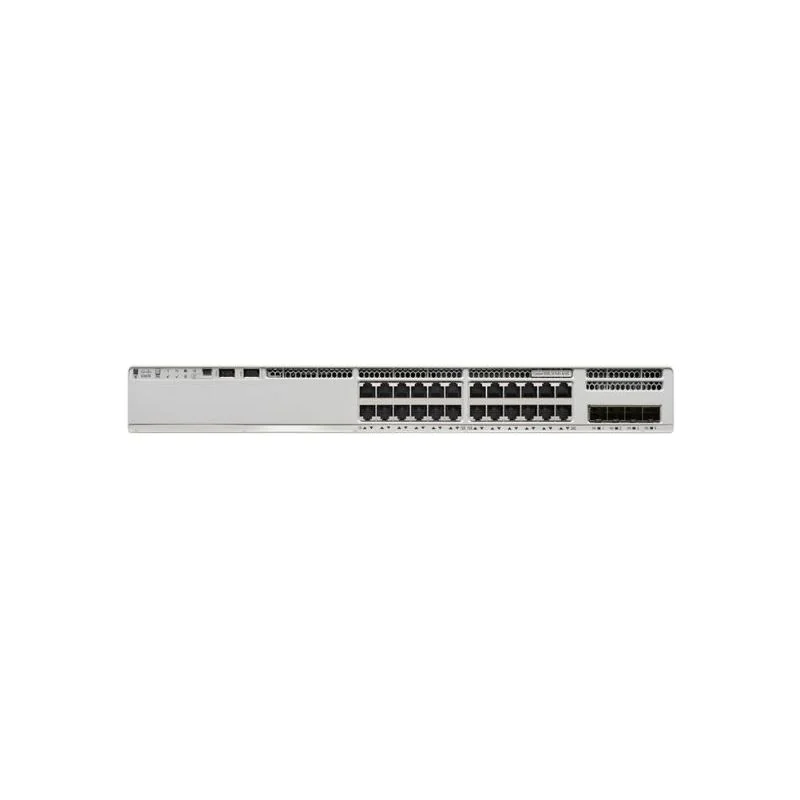
Cisco C9200-24T-A – High-Performance Enterprise Access Switch
Product Overview
The Cisco C9200-24T-A is part of the Cisco Catalyst 9200 Series, designed to provide reliable, high-performance access layer connectivity for enterprise and campus networks. With 24 Gigabit Ethernet ports, this switch delivers secure, scalable, and resilient network connections.
Built for business-critical environments, it combines advanced Layer 2 and Layer 3 features, support for VLAN segmentation, PoE readiness (on specific models), and stacking capabilities via StackWise-160/80. The Cisco C9200-24T-A is ideal for organizations seeking high-speed LAN connectivity, simplified management, and robust security.
Powered by Cisco IOS XE, it supports programmable automation, advanced security, and network monitoring features. It is suitable for branch offices, campus networks, and enterprise deployments, providing a balance of performance, scalability, and operational simplicity.
Hardware Specifications
| Feature | Specification |
|---|---|
| Model | C9200-24T-A |
| Network Interfaces | 24 × 10/100/1000 Gigabit Ethernet RJ45 ports |
| Uplink Interfaces | 4 × 1G/10G SFP/SFP+ optional uplink modules |
| Switching Capacity | 160 Gbps (full-duplex) |
| Forwarding Rate | Approx. 95.2 Mpps |
| Stackable | Yes, via StackWise-160/80 |
| PoE Support | No (non-PoE model) |
| Dimensions (W×D×H) | 44.5 × 40 × 4.45 cm (1U rack-mountable) |
| Operating Temperature | 0°C ~ 45°C |
| LED Indicators | System, port, stack status |
| Fans | Variable-speed fans for energy efficiency |
Key Features
1. High-Performance Access Layer
24 Gigabit Ethernet ports ensure fast and reliable connectivity for end devices.
Optional uplink modules provide flexible connectivity to distribution or core switches.
Forwarding rate up to 95.2 Mpps ensures low-latency packet delivery.
Supports Layer 2 and basic Layer 3 routing for VLAN interconnectivity.
2. StackWise Technology
StackWise-160/80 allows up to 8 switches to operate as a single logical unit.
Provides simplified management through a single IP address.
Enhances network resiliency, allowing traffic to continue flowing in case of individual switch failure.
3. Security & Policy Features
Role-based access control (RBAC) for administrator and user access.
Dynamic ARP Inspection, DHCP Snooping, and IP Source Guard protect against spoofing attacks.
Supports Access Control Lists (ACLs) for traffic filtering and policy enforcement.
Cisco TrustSec integration for identity-based segmentation.
4. Programmability & Automation
Powered by Cisco IOS XE, enabling automation through REST APIs, NETCONF/YANG, and Python scripting.
Zero-touch provisioning allows fast and consistent deployments.
Supports telemetry and streaming data for proactive network monitoring.
5. Energy Efficiency
Variable-speed fans reduce power consumption and noise.
Energy Efficient Ethernet (EEE) for lower operational costs.
Compact 1U rack-mountable design reduces data center footprint.
Cisco C9200-24T-A – High-Performance Enterprise Access Switch
Network Deployment Scenarios
1. Campus Network Deployment
C9200-24T-A can serve as the access layer in a multi-building campus network.
Connects end devices like workstations, IP phones, wireless access points, and security cameras.
Provides VLAN segmentation to isolate voice, data, and guest traffic.
Stackable configuration simplifies management across multiple floors or buildings.
2. Branch Office Deployment
Suitable for branch offices with 20–100 devices.
Supports uplinks to a WAN router or distribution switch.
Provides secure Layer 2 connectivity and optional Layer 3 routing.
VLANs can separate departments such as accounting, HR, and guest access.
3. Industrial & High-Density Deployments
Can be used in industrial environments for connectivity to IoT sensors, cameras, and monitoring systems.
VLAN isolation ensures critical systems are protected from other network traffic.
Provides redundant uplinks and StackWise failover to prevent network downtime.
Cisco C9200-24T-A – High-Performance Enterprise Access Switch
Configuration and Management
1. Initial Setup
Mount switch in 1U rack space.
Connect power and uplink interfaces.
Access the switch via console, web GUI, or SSH.
Assign management IP address and configure default gateway.
2. VLAN & Port Configuration
Create VLANs for traffic separation:
| VLAN ID | Purpose |
|---|---|
| 10 | Voice |
| 20 | Wireless |
| 30 | Corporate LAN |
| 40 | Guest/IoT |
| 50 | Security/CCTV |
Assign switch ports to VLANs.
Configure trunk ports for uplinks to distribution/core switches.
3. StackWise Configuration
Connect StackWise cables to link multiple switches.
Assign stack master or let the system auto-elect.
Monitor stack status and verify all switches are synchronized.
4. Security & QoS
Enable ACLs to filter traffic between VLANs.
Apply QoS policies to prioritize voice and video traffic.
Enable features like DHCP snooping, Dynamic ARP Inspection, and IP Source Guard for security.
High Availability & Redundancy
StackWise ensures continuous operation in case one switch fails.
Dual uplinks provide redundant paths to distribution/core switches.
Layer 3 routing capabilities allow alternate paths for VLAN traffic if a primary uplink fails.
Troubleshooting
Common Issues & Resolutions:
| Issue | Steps to Resolve |
|---|---|
| Port not connecting | Check cable and link speed; verify VLAN membership |
| Stack member offline | Inspect StackWise cables; reboot stack member |
| VLAN traffic not routing | Check VLAN IDs, trunk configuration, and ACLs |
| High CPU utilization | Verify network loops or broadcast storms; check telemetry logs |
| Switch overheating | Check fan operation; ensure proper airflow |
Cisco C9200-24T-A – High-Performance Enterprise Access Switch
Advanced Features
Layer 3 Static Routing: Basic routing between VLANs.
StackWise Virtualization: Treat multiple physical switches as one logical switch.
Telemetry & Analytics: Streaming data for real-time monitoring and alerts.
Programmable API Access: REST API, NETCONF/YANG for automated configuration.
Typical Use Cases
Corporate Campus: Access layer switch connecting employees, APs, and phones.
Branch Office: Reliable Layer 2 connectivity with optional Layer 3 routing.
Industrial Networks: Connect IoT devices, surveillance cameras, and monitoring systems.
Education Campuses: VLAN separation for staff, students, guest Wi-Fi, and labs.
Cisco C9200-24T-A – High-Performance Enterprise Access Switch
Maintenance & Best Practices
Regularly update Cisco IOS XE firmware.
Backup switch configuration periodically.
Monitor stack health, uplinks, and VLAN traffic using telemetry.
Inspect physical environment for heat, dust, and airflow.
Ensure proper VLAN segmentation to minimize broadcast traffic.
Cisco C9200-24T-A – Enterprise Access Layer Deployment & Operations Guide
1. StackWise Configuration & Management
The Cisco C9200-24T-A supports StackWise-160/80, allowing multiple switches to operate as a single logical unit for high availability and simplified management.
Step 1: Physical Setup
Mount switches in the rack.
Connect StackWise cables from the first switch to the last in the stack.
Power on all switches.
Step 2: Stack Master Election
The system automatically elects a stack master based on priority or switch uptime.
You can manually configure a priority if desired:
Verify stack status:
Step 3: Stack Maintenance
Adding or removing stack members is hot-swappable, minimizing downtime.
Monitor stack health using:
Tip: Always check stack cable integrity and use recommended StackWise cables for stability.
Cisco C9200-24T-A – High-Performance Enterprise Access Switch
2. VLAN Deployment & Segmentation
Proper VLAN planning ensures network security, efficiency, and traffic segregation.
Sample VLAN Layout
VLAN ID Purpose Devices Connected 10 Voice IP phones 20 Wireless APs and Wi-Fi clients 30 Corporate LAN Employee PCs and workstations 40 Guest / IoT Guest Wi-Fi, IoT devices 50 Security / CCTV Surveillance cameras and NVRs Configuration Steps
Create VLANs:
Assign switch ports to VLANs:
Configure trunk ports for uplinks:
Tip: Use VLAN naming conventions and maintain a VLAN design document for easier troubleshooting.
3. Uplink & Redundancy Configuration
Cisco C9200-24T-A supports optional uplink modules (1G/10G SFP/SFP+).
Dual uplinks provide high availability to distribution or core switches.
Redundancy Strategies
EtherChannel / LACP: Combine uplinks for increased bandwidth and redundancy.
Spanning Tree Protocol (STP): Prevent network loops while providing failover paths.
VLAN redundancy: Duplicate critical VLANs across multiple uplinks to prevent outages.
4. Quality of Service (QoS) & Traffic Prioritization
Ensuring low-latency traffic for voice and video is crucial in enterprise environments.
Traffic Classification
Traffic Type Priority Action / Queue Voice (IP Phones) Highest DSCP EF, Low-latency queue Video / Conferencing High DSCP AF41, Medium priority queue Corporate Apps Medium DSCP AF21, Standard queue Guest / IoT Low Best-effort queue Configuration Example
Tip: Monitor traffic using:
5. Advanced Security Features
Access Control Lists (ACLs): Filter traffic at the VLAN or port level.
Dynamic ARP Inspection (DAI): Prevent ARP spoofing.
DHCP Snooping: Protect against rogue DHCP servers.
IP Source Guard: Prevent IP address spoofing.
802.1X Authentication: Ensure only authorized devices can connect.
6. Troubleshooting & Maintenance
Common Issues & Steps
Issue Steps to Resolve Port link down Check cable, verify VLAN, use show interface statusStack member offline Inspect StackWise cables, reboot stack member, check priority VLAN traffic not passing Verify VLAN ID, trunk configuration, ACLs High CPU or memory usage Check for loops, broadcast storms, or misconfigured QoS Switch overheating Check fan operation, airflow, rack temperature Useful Commands
7. Deployment Scenarios
Corporate Campus: Stack multiple switches to serve end-users, APs, and phones across floors.
Branch Office: Single switch or stack to support departmental connectivity with secure uplinks.
Industrial / IoT Deployments: VLAN separation for sensors, cameras, and automation systems.
Education Campuses: Isolate student, staff, and guest networks with VLANs and ACLs.
8. Maintenance Best Practices
Keep IOS XE firmware up-to-date.
Maintain backup configurations regularly.
Monitor stack health and uplink redundancy using telemetry.
Check physical environment: heat, dust, airflow.
Maintain network documentation for VLANs, ACLs, and QoS policies.
Cisco C9200-24T-A – Complete Enterprise Deployment & Operations Guide
1. Enterprise Deployment Strategies
The Cisco C9200-24T-A is designed for scalable, resilient enterprise networks. The deployment strategy should consider:
Access Layer Topology: Serve as the access layer for end devices — PCs, IP phones, APs, and IoT devices.
Stacking for Scalability: Stack up to 8 switches to create a single logical unit for simplified management.
Redundant Uplinks: Dual uplinks for connectivity to distribution or core switches, ensuring high availability.
Segmentation & Security: VLAN separation for departments, guest networks, and critical systems.
Traffic Prioritization: QoS policies to ensure low-latency delivery for voice, video, and business-critical apps.
2. StackWise Advanced Configuration
Step 1: Preparing the Stack
Ensure switches are running the same IOS XE version.
StackWise cables must be connected from first to last switch to complete the loop.
Power on all switches simultaneously if possible.
Step 2: Configuring Stack Master Priority
Higher number → higher chance of becoming stack master.
Verify stack master with:
Step 3: Adding a New Switch to an Existing Stack
Connect the new switch via StackWise cables.
Power it on; it will automatically adopt stack configuration.
Check synchronization:
Tip: Always maintain a stacking diagram to track members and uplink connections.
3. VLAN Planning & Deployment
Step 1: VLAN Creation
Plan VLANs based on function and security:
Step 2: Port Assignment
Assign end devices to VLANs:
Configure uplink trunk ports:
Step 3: Inter-VLAN Routing
Use Layer 3 routing capabilities (SVI interfaces) for communication between VLANs:
4. Uplink Redundancy & High Availability
Use dual uplinks to distribution/core switches.
Apply EtherChannel/LACP for increased bandwidth:
Enable Spanning Tree Protocol (STP) to prevent loops and ensure failover.
Test failover by disconnecting one uplink to verify traffic continues on the alternate path.
5. Quality of Service (QoS) Implementation
Step 1: Identify Traffic Classes
Voice (highest)
Video conferencing (high)
Business apps (medium)
Guest/IoT (low)
Step 2: Apply QoS Policies
Step 3: Monitor QoS
Tip: Always verify that voice and video traffic is prioritized under load conditions.
6. Security Best Practices
ACLs: Filter traffic between VLANs or subnets.
Dynamic ARP Inspection: Prevent ARP spoofing attacks.
DHCP Snooping: Protect against rogue DHCP servers.
IP Source Guard: Ensure only valid IP-MAC bindings are allowed.
802.1X Authentication: Enforce device authentication before granting network access.
7. Troubleshooting Workflow
Issue Resolution Steps Port not linking Verify cable, check VLAN assignment, show interface statusStack member offline Check StackWise cables, reboot member, verify priority VLAN traffic not routing Verify SVI IP, trunk config, and ACLs High CPU usage Check for broadcast storms, loops, or misconfigured QoS Switch overheating Check fan operation, rack airflow, temperature Commands for Troubleshooting:
8. Deployment Examples
1. Campus Deployment
Stack multiple switches across floors.
VLANs for voice, wireless, corporate, guest, and security.
Uplinks to distribution layer using EtherChannel.
2. Branch Office Deployment
Single switch or stack for 20–50 devices.
VLAN separation for departments.
Redundant uplinks to WAN router.
3. Industrial / IoT Deployment
VLANs for cameras, sensors, and monitoring systems.
Redundant uplinks for high availability.
StackWise ensures continuous operation if one switch fails.
9. Maintenance Guidelines
Keep Cisco IOS XE firmware up-to-date.
Backup configuration regularly.
Monitor uplink and stack status using telemetry.
Inspect physical environment: dust, heat, and airflow.
Document VLANs, ACLs, QoS policies, and network topology.
Cisco C9200-24T-A – Complete Enterprise Deployment, Configuration, and Operations Guide
1. Introduction
The Cisco C9200-24T-A is a 24-port Gigabit Ethernet access layer switch from the Cisco Catalyst 9200 Series, designed for high-performance, secure, and scalable enterprise networks.
This switch is ideal for branch offices, campuses, and industrial environments due to its StackWise stacking, VLAN segmentation, Layer 3 capabilities, and advanced security features. It supports Cisco IOS XE, enabling automation, telemetry, and simplified management.
Key advantages include:
High-speed Gigabit connectivity for 24 endpoints.
StackWise support for up to 8 switches operating as a single logical unit.
Advanced security features such as ACLs, DHCP snooping, Dynamic ARP Inspection, and IP Source Guard.
Layer 2 and Layer 3 functionality for inter-VLAN routing.
Programmability through REST API, NETCONF/YANG, and Python scripts.
2. Hardware Specifications
Feature Specification Model C9200-24T-A Ports 24 × 1G Ethernet RJ45 Uplink Modules Optional 4 × 1G/10G SFP/SFP+ Switching Capacity 160 Gbps Forwarding Rate 95.2 Mpps StackWise Support Yes, up to 8 switches PoE Support No (non-PoE) Dimensions (W×D×H) 44.5 × 40 × 4.45 cm (1U) Fans Variable-speed fans Operating Temp 0°C – 45°C 3. Key Features
3.1 High-Performance Access Layer
Provides 24 Gigabit Ethernet ports for fast LAN connectivity.
Supports optional uplinks to distribution or core switches.
Layer 2 switching with optional Layer 3 routing ensures efficient VLAN communication.
Forwarding rate of 95.2 Mpps guarantees low latency for mission-critical applications.
3.2 StackWise Technology
Stack up to 8 switches using StackWise-160/80.
Operates as a single logical switch for simplified management.
Enhances network resiliency, maintaining traffic flow even if one member fails.
Stack master election can be automatic or configured based on priority.
3.3 Security & Policy
Role-Based Access Control (RBAC) for secure admin access.
Dynamic ARP Inspection (DAI) prevents ARP spoofing attacks.
DHCP Snooping protects against rogue DHCP servers.
IP Source Guard ensures only authorized IP-MAC bindings are allowed.
802.1X authentication supports secure network access for users and devices.
3.4 Programmability & Automation
Powered by Cisco IOS XE, supporting automation with REST APIs, NETCONF/YANG, and Python.
Zero-touch provisioning allows fast deployment at scale.
Telemetry features provide real-time monitoring for proactive network management.
3.5 Energy Efficiency
Variable-speed fans and Energy Efficient Ethernet (EEE) reduce power consumption.
1U rack design minimizes data center footprint and noise.
4. Deployment Scenarios
4.1 Campus Network Deployment
Stack multiple switches to serve end-users, wireless access points, and IP phones across multiple floors.
VLANs isolate voice, data, guest, and IoT networks.
Redundant uplinks to distribution switches for high availability.
4.2 Branch Office Deployment
Single switch or small stack for 20–50 endpoints.
VLAN separation for departments and guest networks.
Layer 3 routing for inter-VLAN communication if needed.
4.3 Industrial & IoT Deployment
Connect cameras, sensors, and monitoring devices.
VLAN separation protects critical devices from other traffic.
StackWise redundancy ensures minimal downtime in industrial environments.
4.4 Education Campus Deployment
Separate VLANs for staff, students, guest Wi-Fi, and labs.
QoS policies prioritize video conferencing and voice traffic.
StackWise simplifies management across multiple buildings or floors.
5. StackWise Configuration
5.1 Physical Setup
Mount switches in the rack.
Connect StackWise cables from the first to last switch.
Power on all switches simultaneously.
5.2 Stack Master Election
Default is automatic based on uptime.
Manual configuration via priority:
Verify stack master:
5.3 Adding/Removing Switches
Hot-swappable without network downtime.
Ensure new members run the same IOS XE version.
Verify stack synchronization:
6. VLAN Design & Configuration
6.1 VLAN Planning
VLAN ID Purpose 10 Voice 20 Wireless 30 Corporate LAN 40 Guest / IoT 50 Security / CCTV 6.2 Port Assignment
Access ports for end devices:
Trunk ports for uplinks:
6.3 Inter-VLAN Routing
Layer 3 interfaces for VLAN communication:
7. Uplink Redundancy & High Availability
Dual uplinks for connectivity to distribution/core switches.
EtherChannel/LACP configuration for redundancy:
Spanning Tree Protocol ensures loop prevention and failover.
8. Quality of Service (QoS)
Classify and prioritize traffic: voice > video > business apps > guest/IoT.
QoS configuration example:
Monitor traffic:
9. Security Best Practices
ACLs filter traffic between VLANs.
Dynamic ARP Inspection prevents ARP spoofing.
DHCP Snooping protects against rogue DHCP servers.
IP Source Guard enforces valid IP-MAC bindings.
802.1X authentication ensures only authorized devices connect.
10. Troubleshooting
Issue Resolution Steps Port link down Check cable, VLAN assignment, interface status Stack member offline Inspect StackWise cables, reboot member VLAN traffic not routing Verify SVI IPs, trunk ports, ACLs High CPU usage Check for loops, broadcast storms, misconfigured QoS Switch overheating Verify fans, rack airflow, ambient temperature Commands for troubleshooting:
11. Advanced Operational Tips
Regularly update Cisco IOS XE firmware for security and features.
Backup configurations frequently.
Monitor stack, VLAN, and uplink performance using telemetry.
Maintain proper rack airflow and temperature.
Document all VLANs, ACLs, QoS policies, and stack topology.
Purchase & Support – Choicecycle (SGCCTV Singapore)
For Cisco C9200-24T-A switches, installation, configuration, and local support:

📍 Store Location: Sim Lim Square #02-81, Singapore
🕒 Operating Hours: 11 AM – 8 PM
📞 WhatsApp: +65 9853 4404
📧 Email: [email protected]
🌐 Website: https://sgcctv.biz


Nunc lacus elit, faucibus ac laoreet sed, dapibus ac mi. Maecenas eu ante a elit tempus fermentum. Aliquam commodo tincidunt semper. Phasellus accumsan, justo ac mollis pharetra, ex dui pharetra nisl, a scelerisque ipsum nulla ac sem. Cras eu risus urna. Duis lorem sapien, congue eget nisl sit amet, rutrum faucibus elit.
Donec accumsan auctor iaculis. Sed suscipit arcu ligula, at egestas magna molestie a. Proin ac ex maximus, ultrices justo eget, sodales orci. Aliquam egestas libero ac turpis pharetra, in vehicula lacus scelerisque. Vestibulum ut sem laoreet, feugiat tellus at, hendrerit arcu.
Nunc lacus elit, faucibus ac laoreet sed, dapibus ac mi. Maecenas eu ante a elit tempus fermentum. Aliquam commodo tincidunt semper. Phasellus accumsan, justo ac mollis pharetra, ex dui pharetra nisl, a scelerisque ipsum nulla ac sem. Cras eu risus urna. Duis lorem sapien, congue eget nisl sit amet, rutrum faucibus elit.