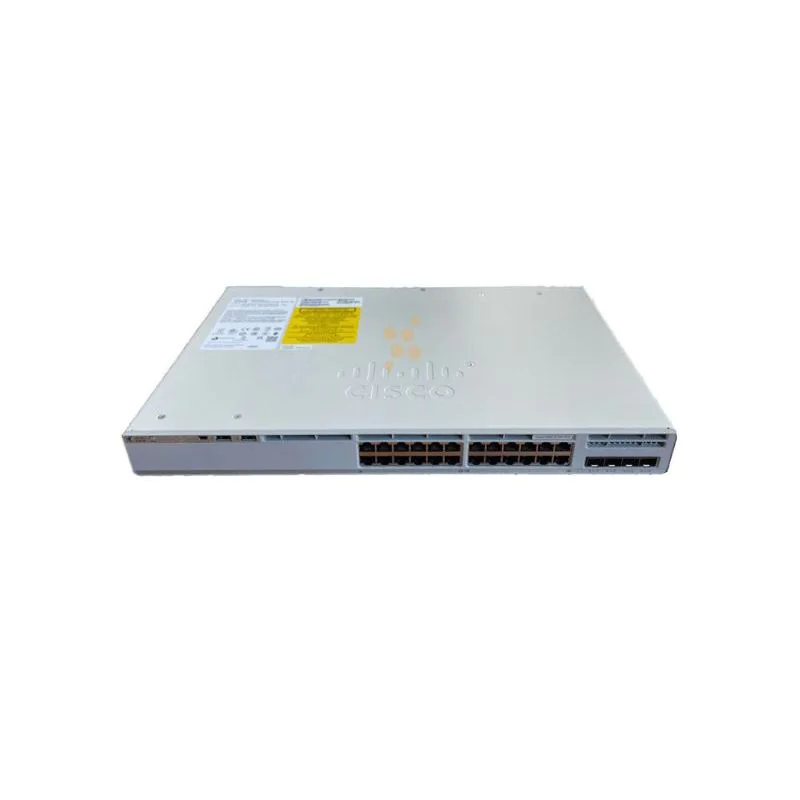
Cisco C9200L-24P-4G-A – Enterprise-Class Stackable Switch for Modern Networks
Product Overview
The Cisco C9200L-24P-4G-A is part of the Catalyst 9200L series, offering a robust, enterprise-grade switching solution for modern network environments. Designed for medium to large enterprise networks, it provides high performance, advanced security, and flexibility to meet the demands of data-driven applications, voice, and video traffic.
With 24 Gigabit Ethernet ports and 4 SFP uplinks, this switch enables high-speed access for end devices while connecting efficiently to distribution or core layers. Its stackable design allows multiple units to operate as a single logical switch, simplifying management and scaling network capacity.
Powered by Cisco IOS XE, it offers programmable software architecture, automation capabilities, and advanced network analytics, ensuring operational efficiency and future-ready deployments.
Hardware Specifications
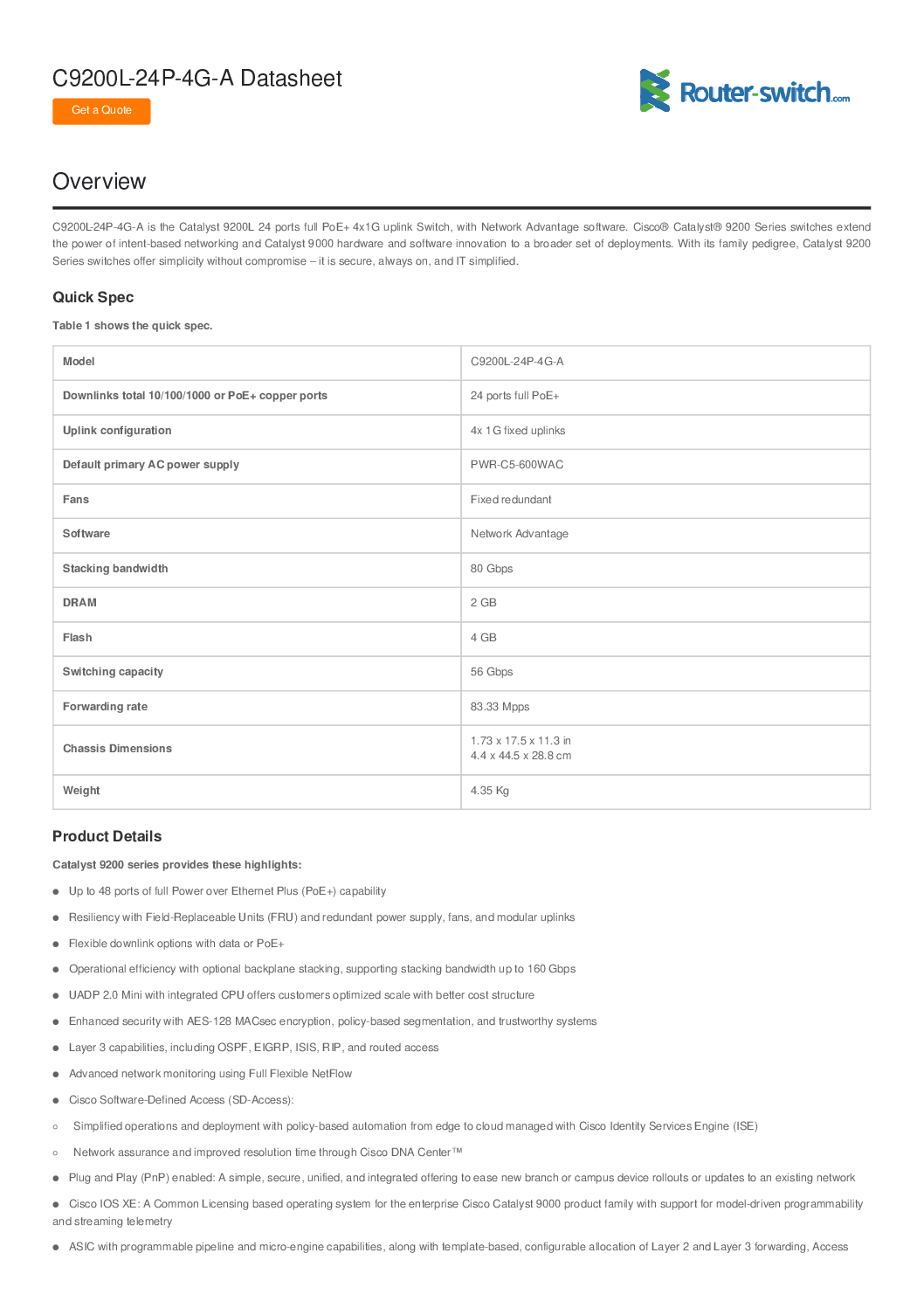
| Feature | Specification |
|---|---|
| Model | C9200L-24P-4G-A |
| Ports | 24 × 10/100/1000 Ethernet PoE+ ports |
| Uplink Ports | 4 × 1G SFP uplinks |
| PoE Budget | 370W |
| Switching Capacity | 128 Gbps |
| Forwarding Rate | 95.2 Mpps |
| Stacking Capability | Up to 8 switches per stack |
| Redundancy | StackPower for power redundancy |
| Dimensions (W×D×H) | 44.5 × 43 × 4.45 cm (1U rack) |
| Operating Temperature | 0°C ~ 40°C |
| Mounting | Rack-mountable (1U) |
| Fan | Variable-speed fans for cooling |
| LED Indicators | Port, system, stack, PoE status |
Key Features and Capabilities
1. High-Performance Switching
24 Gigabit Ethernet ports provide fast access connectivity.
4 SFP uplinks allow high-speed aggregation to core networks or distribution layers.
Switching capacity of 128 Gbps supports simultaneous traffic across all ports.
2. PoE+ Capabilities
Each PoE+ port can supply up to 30W, sufficient for IP phones, access points, and security cameras.
Total PoE budget of 370W enables powering multiple devices without separate power sources.
Supports intelligent PoE allocation, ensuring critical devices remain powered in case of budget constraints.
3. Stackable Architecture
Up to 8 units can be stacked using Cisco StackWise technology.
Stacked switches function as a single logical unit, simplifying configuration, monitoring, and troubleshooting.
StackPower provides redundant power pooling across multiple switches for high availability.
4. Advanced Software and Automation
Powered by Cisco IOS XE, a modern, programmable, and fully-featured network operating system.
Supports automation via APIs, allowing configuration changes across multiple switches efficiently.
Offers network telemetry and analytics for proactive monitoring and management.
Built-in segment routing and traffic prioritization enables smooth operation of latency-sensitive applications such as VoIP and video conferencing.
5. Security and Access Control
Supports IEEE 802.1X for port-based access control and authentication.
Role-based access control for devices connected to the network.
Integrated Access Control Lists (ACLs) to control traffic flow and enforce security policies.
Features MAC address filtering and DHCP snooping to prevent unauthorized access.
Network Deployment Scenarios
1. Enterprise Access Layer Deployment
The switch is ideal for access layer deployments, connecting end devices such as:
IP phones
Workstations
Wireless access points
Networked security cameras
By leveraging PoE+ capabilities, devices can receive both power and data over a single Ethernet cable, reducing cable clutter and installation costs.
2. Small to Medium Branch Offices
Stackable architecture allows scaling without replacing hardware.
Supports connectivity to core or distribution switches through 4 SFP uplinks.
Ideal for environments requiring secure, manageable, and resilient networks.
3. Campus or Multi-Building Deployments
Switch stacking enables multiple units to operate as a single logical switch across floors or buildings.
Redundant power via StackPower enhances network reliability.
Supports VLANs for traffic segmentation, ensuring performance and security.
Cisco C9200L-24P-4G-A – Enterprise-Class Stackable Switch for Modern Networks
Configuration and Management
1. Initial Setup
Power on the switch using redundant AC power supplies.
Connect uplink ports to distribution or core network switches.
Configure initial IP addressing and management credentials via console or web GUI.
2. Stack Configuration
Use StackWise cables to connect multiple switches.
Assign a priority switch in the stack for control.
Configure stack management via IOS XE for centralized monitoring.
3. VLAN and Network Segmentation
Create VLANs for different departments or traffic types.
Assign ports to appropriate VLANs to ensure traffic separation and security.
Enable inter-VLAN routing at higher network layers if necessary.
4. PoE Management
Configure PoE priorities to ensure critical devices receive power.
Monitor PoE consumption and port status to avoid overloads.
5. Monitoring and Telemetry
Use SNMP or NetFlow for network monitoring.
Analyze traffic patterns and device performance using built-in IOS XE tools.
Enable logging and alerts for proactive network maintenance.
High Availability and Redundancy
StackPower allows power sharing across switches in a stack.
Redundant uplinks via SFP ensure connectivity in case of link failure.
StackWise provides instant failover if a member switch fails, maintaining continuous network operation.
Supports hot-swappable fans and power supplies, reducing downtime during maintenance.
Advanced Network Features
Quality of Service (QoS)
Supports 8 egress queues per port.
Prioritizes traffic for latency-sensitive applications like voice and video.
Link Aggregation
Combine multiple physical ports into a single logical link.
Increases bandwidth and provides redundancy for uplink connections.
Network Segmentation and Security
Supports private VLANs and ACLs.
Provides segmentation for critical applications or sensitive data.
Automation and Programmability
REST APIs and NETCONF/YANG support for automated configuration.
Telemetry streams enable real-time network monitoring and analytics.
Cisco C9200L-24P-4G-A – Enterprise-Class Stackable Switch for Modern Networks
Maintenance and Troubleshooting
1. Regular Maintenance
Check PoE consumption and port status.
Verify stack and uplink health.
Update IOS XE firmware periodically for security and performance enhancements.
2. Troubleshooting Steps
Inspect LED indicators for system and port status.
Use console or web interface for logs and alerts.
Test connectivity to uplinks and member devices.
Replace faulty modules or fan/power units without disrupting the stack.
Cisco C9200L-24P-4G-A – Comprehensive Deployment, Configuration, and Maintenance Guide
1. Large Enterprise Deployment Scenario
Scenario: Medium to large office building or campus network with 200+ connected devices including IP phones, wireless access points, and workstations.
Deployment Objectives:
High-speed connectivity at the access layer
Redundant uplinks to distribution/core layers
Centralized management and monitoring
PoE provisioning for endpoint devices
Step-by-Step Deployment
Step 1: Survey & Network Planning
Identify device locations, wiring closets, and core network uplinks.
Calculate PoE requirements for all IP devices.
Plan VLAN segmentation based on department or traffic type.
Design StackWise topology if multiple switches are used.
Step 2: Switch Installation
Rack-mount the C9200L-24P-4G-A units in 1U racks.
Connect AC power and ensure redundant power sources are available.
Stack multiple units using StackWise cables to operate as a single logical switch.
Step 3: Port Assignment & PoE Configuration
Assign PoE+ ports to IP phones and access points.
Use intelligent PoE management to prioritize critical devices.
Monitor PoE consumption using the management interface.
Step 4: VLAN & Traffic Segmentation
Create VLANs for different traffic types:
VLAN 10: Voice / IP Phones
VLAN 20: Wireless / APs
VLAN 30: Workstations / Corporate
VLAN 40: Guest / IoT devices
Assign ports to respective VLANs to ensure traffic isolation.
Step 5: Uplink & Redundancy Configuration
Connect 4 SFP uplinks to distribution or core switches.
Enable link aggregation (LACP) for higher bandwidth and failover.
Configure StackPower for redundant power across the stack.
Enable StackWise failover to maintain operations in case of switch failure.
Step 6: Testing & Verification
Verify connectivity for all end devices.
Confirm PoE delivery to all powered devices.
Test uplink redundancy and failover by temporarily disconnecting one uplink.
Ensure VLAN segregation and QoS rules are applied correctly.
2. PoE Planning for 100+ Devices
Device Type Quantity Power per Device (W) Total Power (W) Notes IP Phones 80 6.5 520 Standard PoE sufficient Wireless APs 20 12.5 250 PoE+ recommended Security Cameras 12 15 180 PoE+ recommended Total PoE Required 950 Well within 370W per switch, requires multiple switches for full coverage PoE Best Practices:
Use multiple C9200L-24P-4G-A switches to distribute load.
Reserve high-priority ports for critical devices.
Monitor PoE usage in real time to prevent overloads.
3. StackWise Topology & Management
Stacking Capabilities:
Up to 8 switches per stack.
Single logical switch for configuration, monitoring, and management.
StackPower allows pooled power for redundancy across the stack.
Stack Management Tips:
Assign a priority switch as stack master.
Update firmware uniformly across all stack members.
Use console or web GUI to monitor stack health and connected devices.
4. VLAN and QoS Configuration
Sample VLAN Design:
VLAN ID Purpose Traffic Type 10 Voice IP phones / VoIP 20 Wireless Wi-Fi traffic / APs 30 Corporate Workstations / PCs 40 Guest / IoT Limited bandwidth / segregated 50 Security Cameras CCTV video streams QoS Configuration:
Assign high priority to voice and video traffic.
Apply traffic shaping and queuing for latency-sensitive applications.
Monitor bandwidth utilization per VLAN.
5. Redundancy and High Availability
Link Aggregation: Combine multiple uplink ports to increase bandwidth and provide failover.
StackPower: Pooled power for uninterrupted operation during PSU failure.
StackWise Failover: Single logical switch continues operation if a member fails.
Hot-Swappable Fans & Power Supplies: Allows maintenance without downtime.
Example Redundant Uplink Setup:
Uplink 1: Connect to primary distribution switch
Uplink 2: Connect to secondary distribution switch
Configure LACP on both links for aggregated bandwidth
Test failover by disabling uplink 1 and ensuring traffic switches to uplink 2
6. Troubleshooting Guide
Issue 1: Devices Not Receiving PoE
Verify port configuration and PoE settings.
Check total PoE budget per switch.
Test devices on alternate ports.
Issue 2: VLAN Traffic Issues
Ensure port VLAN assignment matches configuration.
Verify trunk ports between switches.
Test connectivity with ping or traceroute.
Issue 3: StackWise Failure
Inspect StackWise cables and port integrity.
Confirm priority switch is online.
Update IOS XE firmware across all stack members.
Issue 4: Uplink Redundancy Not Working
Check LACP configuration and interface status.
Confirm both uplink switches support link aggregation.
Monitor failover response and logs.
Cisco C9200L-24P-4G-A – Enterprise-Class Stackable Switch for Modern Networks
7. Industrial and Smart Office Deployment Use Cases
Enterprise Office Network
Powers VoIP phones, wireless APs, and desktop workstations
Provides centralized management and monitoring
Campus Network
Stack multiple switches across buildings
VLAN segmentation for administrative, academic, and guest networks
Branch Office
Scalable stackable switch for small-to-medium offices
Redundant uplinks ensure uninterrupted connectivity
Industrial Network
Powers IP phones, APs, and sensors over PoE
VLAN isolation separates production, monitoring, and corporate networks
StackPower redundancy ensures continuous operation
8. Extended FAQ
How many switches can be stacked? Up to 8
Maximum PoE budget? 370W per switch
Can it power APs and IP phones simultaneously? Yes, PoE+ supported
Suitable for branch office deployment? Yes, stackable and compact
How to configure VLANs? Via IOS XE CLI or GUI
StackPower configuration? Provides pooled power across stack members
Can it prioritize traffic? Yes, QoS for voice and video
How to upgrade firmware? Using USB, TFTP, or network repository
Forwarding rate? 95.2 Mpps
Redundant uplinks? Supported via SFP ports and LACP
9. Purchase & Support – Choicecycle (SGCCTV Singapore)
For authentic Cisco C9200L-24P-4G-A switches, local support, and professional guidance, contact:
📍 Store Location: Sim Lim Square #02-81, Singapore
🕒 Operating Hours: 11 AM – 8 PM
📞 WhatsApp: +65 9853 4404
📧 Email: [email protected]
🌐 Website: https://sgcctv.biz
Cisco C9200L-24P-4G-A – Enterprise-Class Stackable Switch for Modern Networks
Cisco C9200L-24P-4G-A – Ultimate Enterprise Deployment & Maintenance Guide
1. Multi-Floor Campus Deployment Example
Scenario: University or corporate campus with 300+ devices across 4–6 buildings, including:
Workstations
IP Phones
Wireless Access Points
Security Cameras
Deployment Strategy
Step 1: Survey & Network Planning
Map device locations, patch panels, and wiring closets.
Calculate PoE requirements per device and per switch.
Design VLANs based on departments or traffic types.
Plan StackWise topology for centralized management.
Step 2: Rack Installation & StackWise Setup
Mount C9200L-24P-4G-A switches in 1U racks.
Connect redundant AC power supplies.
Stack switches using StackWise cables to create a single logical switch.
Assign a stack master for centralized configuration.
Step 3: PoE Device Allocation
Assign PoE+ ports for APs, IP phones, and cameras.
Monitor PoE consumption using IOS XE interface or management tools.
Reserve high-priority ports for critical devices.
Step 4: VLAN Configuration
VLAN 10: Voice / IP phones
VLAN 20: Wireless / APs
VLAN 30: Workstations / Corporate
VLAN 40: Guest / IoT devices
VLAN 50: Security Cameras
Step 5: Uplink & Redundancy
Connect 4 SFP uplinks to distribution/core layer switches.
Enable LACP for uplink aggregation and failover.
Use StackPower for redundant power pooling.
Step 6: Verification
Ping all end devices and uplinks to ensure connectivity.
Confirm PoE is delivered correctly.
Test redundancy by disconnecting one uplink temporarily.
Verify VLAN isolation and QoS rules.
2. PoE Planning for Large Deployments
| Device Type | Quantity | Power per Device (W) | Total Power (W) | Notes |
|---|---|---|---|---|
| IP Phones | 100 | 6.5 | 650 | PoE sufficient |
| Wireless APs | 40 | 12.5 | 500 | PoE+ recommended |
| Security Cameras | 20 | 15 | 300 | PoE+ recommended |
| Total PoE Required | 1450 | Multiple switches required |
PoE Best Practices:
Distribute high-power devices evenly across switches.
Keep 20–30% overhead for future expansion.
Monitor PoE consumption periodically.
Prioritize mission-critical devices in case of power shortage.
3. StackWise Topology
Stacking Configuration:
Up to 8 switches per stack.
Stack behaves as single logical unit for management and configuration.
Enables centralized monitoring of all ports, PoE consumption, and VLANs.
StackPower allows power sharing across switches.
Stack Setup Example:
Best Practices:
Assign the most reliable unit as stack master.
Ensure firmware consistency across all members.
Use redundant power supplies for high availability.
4. VLAN Design and Traffic Segmentation
Sample VLAN Table:
| VLAN ID | Purpose | Description |
|---|---|---|
| 10 | Voice | IP phones, VoIP traffic |
| 20 | Wireless | Wi-Fi traffic from APs |
| 30 | Corporate | Workstations, PCs |
| 40 | Guest / IoT | Limited bandwidth, IoT devices |
| 50 | Security Cameras | CCTV video streams |
Traffic Management Tips:
Apply QoS rules to prioritize voice and video.
Use private VLANs for sensitive devices like cameras.
Ensure inter-VLAN routing is performed at distribution or core layers.
5. Redundancy and High Availability
Uplink Redundancy:
Dual uplinks per switch to distribution/core layer.
Use link aggregation (LACP) for bandwidth and failover.
Test by disabling one uplink and verifying continuous operation.
Power Redundancy:
StackPower allows power sharing across switches.
Hot-swappable PSUs prevent downtime during replacement.
StackWise Failover:
If a switch in the stack fails, the remaining switches continue operation.
Ensures minimal network disruption.
6. Troubleshooting Guide
Issue: Devices Not Receiving PoE
Verify port configuration and PoE enablement.
Check PoE budget per switch.
Test device on alternate ports.
Issue: VLAN Traffic Not Segregated
Verify VLAN IDs match across switches.
Check trunk port configuration.
Test connectivity with ping or traceroute.
Issue: StackWise Failure
Inspect StackWise cables and connections.
Ensure stack master is online.
Update IOS XE firmware uniformly.
Issue: Uplink Redundancy Not Working
Check LACP configuration on both ends.
Inspect SFP modules and uplink cables.
Monitor traffic failover.
7. Industrial and Smart Office Use Cases
Corporate Network – Powers IP phones, APs, and workstations. Centralized management ensures operational efficiency.
Campus Network – Stack switches across multiple buildings with VLAN isolation and redundant uplinks.
Branch Office – Compact, stackable solution with PoE+ for APs and IP phones.
Industrial Network – Powers cameras, sensors, and APs with PoE+; VLANs isolate production and monitoring networks.
8. Extended FAQ
Maximum number of stackable switches? 8
Maximum PoE budget per switch? 370W
Can it power APs and IP phones simultaneously? Yes
Suitable for branch office deployments? Yes
How to configure VLANs? Via IOS XE CLI or web GUI
How does StackPower work? Provides pooled power across stack members
Can it prioritize traffic? Yes, via QoS
Firmware upgrades? USB, TFTP, or network repository
Forwarding rate? 95.2 Mpps
Redundant uplinks? Supported via SFP ports with LACP
Cisco C9200L-24P-4G-A – Complete Enterprise Deployment, Configuration, and Maintenance Guide
1. Multi-Building Campus Deployment
Scenario: Corporate or university campus with 300+ devices spanning 4–6 buildings, including:
IP Phones
Wireless Access Points
Workstations
Security Cameras
Deployment Goals:
High-speed access layer connectivity
Redundant uplinks to core/distribution switches
Centralized management of multiple switches
PoE provisioning for all powered devices
Step 1: Network Survey & Planning
Map all device locations and patch panels.
Calculate PoE requirements per switch and device type.
Design VLANs for traffic segregation by department or function.
Plan stackable switch locations for StackWise configuration.
Tip: Keep critical PoE devices close to switches to prevent cable loss or voltage drop.
Step 2: Rack Installation & StackWise Setup
Mount C9200L-24P-4G-A in 1U racks in each wiring closet.
Connect redundant AC power supplies.
Stack multiple switches using StackWise cables to form a single logical unit.
Assign a stack master for centralized control.
Stack Example:
Step 3: PoE Device Allocation
Device Type Quantity Power per Device (W) Total Power (W) IP Phones 100 6.5 650 Wireless APs 40 12.5 500 Cameras 20 15 300 Total 1450 PoE Planning Tips:
Distribute high-power devices evenly across switches.
Keep 20–30% overhead for future expansion.
Prioritize critical devices in PoE allocation.
Monitor consumption in real time via IOS XE.
2. VLAN Design & Traffic Segmentation
VLAN Example Table:
VLAN ID Purpose Traffic Type 10 Voice IP Phones / VoIP 20 Wireless Wi-Fi AP traffic 30 Corporate Workstations / PCs 40 Guest / IoT Limited bandwidth / IoT devices 50 Security Cameras CCTV video streams Traffic Management:
Apply QoS rules to prioritize voice and video traffic.
Use private VLANs for sensitive devices like cameras.
Inter-VLAN routing is managed at core/distribution layer.
Diagram Example:
3. Redundancy & High Availability
Uplink Redundancy:
Dual uplinks per switch to distribution/core layer.
Enable LACP for aggregated bandwidth and failover.
Power Redundancy:
StackPower allows shared power across switches.
Hot-swappable PSUs prevent downtime during replacement.
StackWise Failover:
Remaining switches continue operating if one fails.
Ensures minimal disruption to network services.
4. Deployment Example – Industrial / Factory Floor
Scenario: Manufacturing facility with IoT sensors, cameras, and APs.
Deployment Steps:
Place switches in control cabinets with proper cooling.
Use PoE+ to power cameras and sensors.
Create VLANs for production, monitoring, and corporate networks.
Connect uplinks via fiber to the central control room.
Enable StackPower and StackWise failover for reliability.
Outcome:
Continuous operation of IoT and security devices.
VLAN isolation enhances security and network performance.
Centralized management reduces administrative overhead.
5. Advanced Troubleshooting Workflow
Issue 1: Devices Not Receiving PoE
Check port configuration and PoE settings.
Verify PoE budget per switch.
Test the device on another port.
Issue 2: VLAN Traffic Misrouting
Confirm VLAN IDs match across switches.
Check trunk port configuration.
Use ping/traceroute to test connectivity.
Issue 3: StackWise Failure
Inspect StackWise cables.
Verify stack master is online.
Update IOS XE firmware uniformly.
Issue 4: Uplink Redundancy Not Working
Check LACP configuration.
Inspect fiber modules and cabling.
Monitor failover logs and traffic.
6. PoE & Device Planning Charts
PoE Distribution for 150 Devices Across 3 Switches:
Switch IP Phones APs Cameras PoE Budget (W) Remaining Switch1 40 15 7 370 0 Switch2 35 15 7 370 0 Switch3 25 10 6 370 20 Notes:
Reserve extra ports for future devices.
Ensure critical devices have higher PoE priority.
Cisco C9200L-24P-4G-A – Enterprise-Class Stackable Switch for Modern Networks
7. StackWise & Redundancy Visual Topology
Failover Example:
If Switch2 fails, StackWise ensures Switch1 and Switch3 continue operation.
PoE devices remain powered through StackPower.
Purchase & Support – Choicecycle (SGCCTV Singapore)
For authentic Cisco C9200L-24P-4G-A switches, expert consultation, and local support, contact:

📍 Store Location: Sim Lim Square #02-81, Singapore
🕒 Operating Hours: 11 AM – 8 PM
📞 WhatsApp: +65 9853 4404
📧 Email: [email protected]
🌐 Website: https://sgcctv.biz


Nunc lacus elit, faucibus ac laoreet sed, dapibus ac mi. Maecenas eu ante a elit tempus fermentum. Aliquam commodo tincidunt semper. Phasellus accumsan, justo ac mollis pharetra, ex dui pharetra nisl, a scelerisque ipsum nulla ac sem. Cras eu risus urna. Duis lorem sapien, congue eget nisl sit amet, rutrum faucibus elit.
Donec accumsan auctor iaculis. Sed suscipit arcu ligula, at egestas magna molestie a. Proin ac ex maximus, ultrices justo eget, sodales orci. Aliquam egestas libero ac turpis pharetra, in vehicula lacus scelerisque. Vestibulum ut sem laoreet, feugiat tellus at, hendrerit arcu.
Nunc lacus elit, faucibus ac laoreet sed, dapibus ac mi. Maecenas eu ante a elit tempus fermentum. Aliquam commodo tincidunt semper. Phasellus accumsan, justo ac mollis pharetra, ex dui pharetra nisl, a scelerisque ipsum nulla ac sem. Cras eu risus urna. Duis lorem sapien, congue eget nisl sit amet, rutrum faucibus elit.