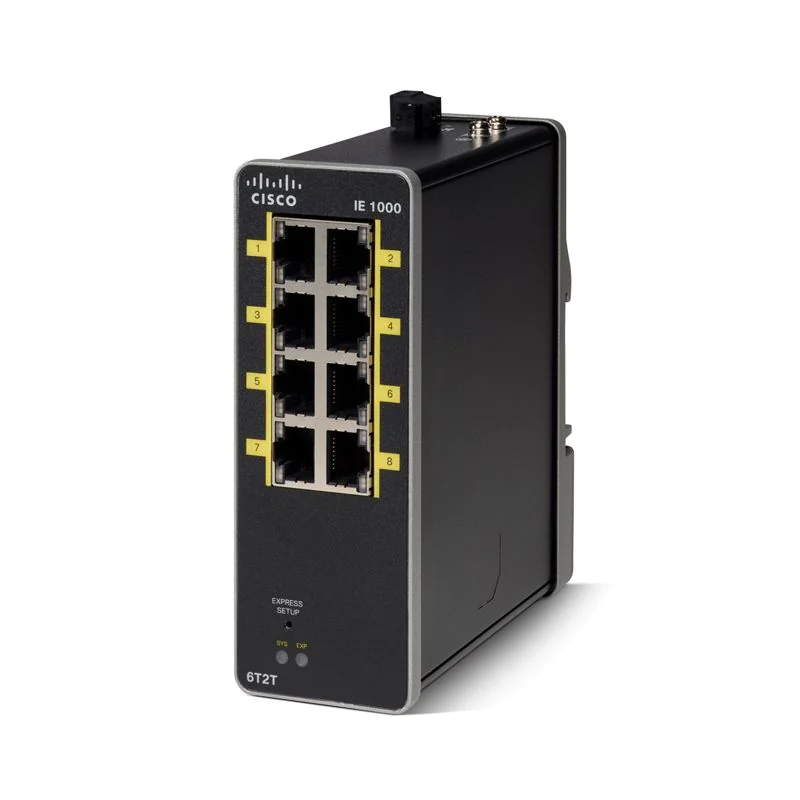
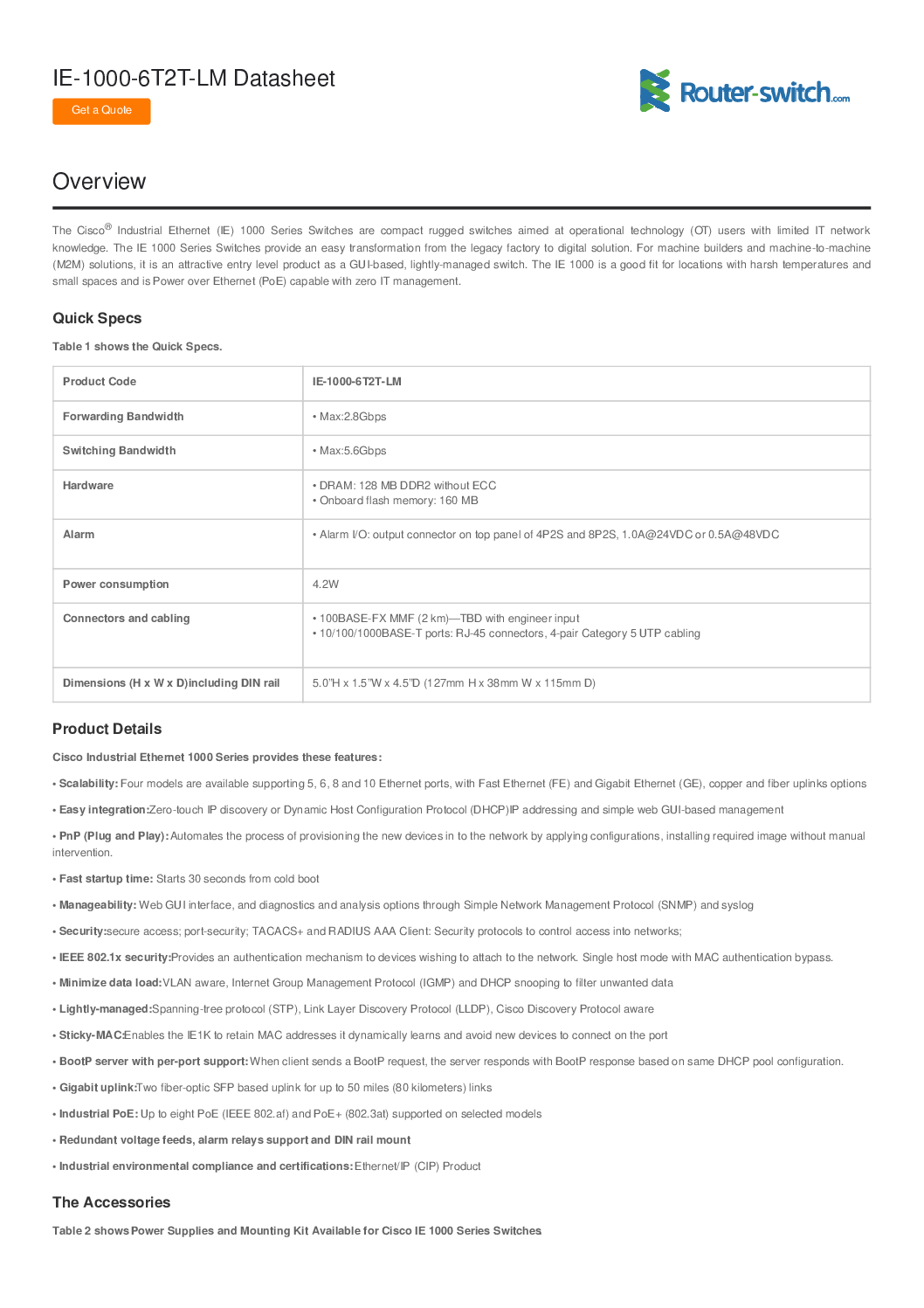
Cisco IE-1000-6T2T-LM Industrial Ethernet Switch – High-Performance Rugged Networking Solution
The Cisco IE-1000-6T2T-LM is a high-performance industrial Ethernet switch designed for mission-critical environments. Combining durability, reliability, and advanced connectivity options, this switch is ideal for manufacturing floors, smart factories, energy plants, transportation networks, and other industrial applications that require robust networking solutions. With Cisco IE series reliability, the IE-1000-6T2T-LM delivers seamless connectivity, predictable performance, and long-term stability.
Overview of IE-1000-6T2T-LM
The IE-1000-6T2T-LM is part of Cisco’s industrial Ethernet switch lineup. It features 6 RJ45 10/100/1000 ports and 2 SFP ports, providing a flexible mix of copper and fiber connectivity for both standard and long-distance connections. Designed to meet the demands of harsh industrial environments, this switch supports extended operating temperatures, high vibration, and electrical noise immunity.
Key highlights include:
6 x Gigabit Ethernet RJ45 Ports – For standard copper connections to industrial devices.
2 x Gigabit SFP Slots – For fiber-optic links, allowing longer distance or more secure communication.
Layer 2 Switching – Reliable data forwarding with VLAN support, QoS, and network segmentation.
Industrial-Rugged Design – Operates in extreme temperatures, vibration, and EMI-heavy environments.
Easy Deployment – Compact form factor, DIN rail mountable, suitable for space-constrained setups.
Industrial Applications
The Cisco IE-1000-6T2T-LM is engineered for industries where downtime is costly and network reliability is non-negotiable. Typical applications include:
Manufacturing and Production Facilities
Connects PLCs, HMIs, and industrial sensors.
Supports high-speed automation and real-time monitoring.
Energy and Utilities
Ideal for power plants, substations, and renewable energy sites.
Provides secure, high-availability networking for critical SCADA systems.
Transportation and Logistics
Enables intelligent traffic systems, railway signaling, and fleet monitoring.
Fiber connectivity ensures long-distance links between control centers.
Oil & Gas and Chemical Industries
Resistant to harsh chemicals, temperature extremes, and vibrations.
Enables remote monitoring and control of pipelines and equipment.
Cisco IE-1000-6T2T-LM Industrial Ethernet Switch – High-Performance Rugged Networking Solution
Key Features and Benefits
1. Rugged Industrial Design
Extended Temperature Range: Operates from -40°C to +75°C.
Vibration and Shock Resistant: Suitable for mobile and industrial applications.
EMI/EMC Protection: Ensures stable performance in electrically noisy environments.
2. High-Performance Switching
6 Gigabit Copper Ports: Fast, reliable connections for industrial devices.
2 Fiber Ports: Optional SFP modules allow secure long-distance communication.
Layer 2 Switching: VLANs, QoS, and multicast support for efficient network segmentation.
3. Easy Installation and Management
DIN Rail Mounting: Compact, space-saving installation.
Web-Based Management Interface: Easy to configure without complex CLI commands.
SNMP Support: Enables integration with existing network monitoring systems.
4. Scalability and Flexibility
Mixed Copper and Fiber Connectivity: Adapts to both short and long-range networking needs.
Redundant Power Supply Support: Ensures uninterrupted operation in critical environments.
Stackable Options: Allows network expansion without significant reconfiguration.
5. Security and Reliability
Network Segmentation: VLANs prevent unauthorized access to sensitive systems.
QoS (Quality of Service): Ensures critical industrial traffic gets priority.
Reliable Industrial Firmware: Cisco IOS reliability for industrial environments.
Technical Specifications
| Feature | Specification |
|---|---|
| Ports | 6 x 10/100/1000 RJ45, 2 x Gigabit SFP |
| Switching Capacity | 16 Gbps |
| Forwarding Rate | 11.9 Mpps |
| Operating Temperature | -40°C to +75°C |
| Power Input | 12–48 VDC |
| Mounting | DIN rail |
| LED Indicators | Power, Link/Activity, SFP Status |
| Standards | IEEE 802.3, 802.3u, 802.3ab, 802.1Q VLAN |
| Management | Web GUI, SNMP, Telnet, SSH |
Cisco IE-1000-6T2T-LM Industrial Ethernet Switch – High-Performance Rugged Networking Solution
Installation and Configuration
The IE-1000-6T2T-LM is designed for plug-and-play installation, making it ideal for industrial operators who need quick deployment without downtime. Key installation steps include:
Mount the Switch – Attach to DIN rail or panel for secure placement.
Connect Power Supply – Supports redundant power options for critical systems.
Connect Network Devices – Use RJ45 ports for copper connections; install SFP modules for fiber links.
Configure via Web GUI – Access the web interface to assign IPs, VLANs, and QoS policies.
Test Connectivity – Verify link status, LEDs, and SNMP monitoring.
Cisco’s industrial switches are designed so you don’t need extensive networking expertise to get your devices online.
Why Choose the IE-1000-6T2T-LM?
Durability: Built to withstand the toughest industrial environments.
High Performance: Gigabit throughput ensures low latency and reliable communication.
Scalable: Supports network growth with SFP ports and stacking capability.
Ease of Use: Web GUI and DIN rail mounting simplify deployment.
Cisco Reliability: Trusted Cisco IOS software ensures long-term stability.
Buying Considerations
When selecting the IE-1000-6T2T-LM, consider:
Number of Devices: Supports 6 copper ports and 2 fiber uplinks, adequate for small-to-medium industrial networks.
Environmental Conditions: Suitable for temperature extremes and high EMI areas.
Network Redundancy Needs: Optional redundant power supply increases uptime.
Future Expansion: Consider fiber uplink ports for longer-distance connections.
Budget: Offers a balance of high performance and industrial-grade reliability.
Conclusion
The Cisco IE-1000-6T2T-LM is a robust, flexible, and high-performance industrial Ethernet switch. It combines Cisco’s legendary reliability with industrial durability, making it an ideal choice for factories, power plants, transportation systems, and other critical infrastructures. With its mix of copper and fiber connectivity, Layer 2 management, and rugged design, the IE-1000-6T2T-LM ensures your industrial network is always online, secure, and efficient.
Comparing the IE-1000-6T2T-LM with Other Cisco Industrial Ethernet Switches
When choosing an industrial switch, it’s important to understand how the IE-1000-6T2T-LM compares to other models in Cisco’s lineup.
| Model | Ports | Fiber Support | Max Temp | Use Case | Key Benefit |
|---|---|---|---|---|---|
| IE-1000-6T2T-LM | 6 RJ45 + 2 SFP | Yes | -40°C to 75°C | Small to mid-sized industrial networks | Balanced performance & ruggedness |
| IE-1000-8T-LM | 8 RJ45 | No | -40°C to 75°C | Simple factory setups | Higher port count for copper devices |
| IE-2000-8TC | 8 RJ45 + 2 SFP | Yes | -40°C to 70°C | Smart factories & automation | Layer 2+ support, limited scalability |
| IE-3000-12T | 12 RJ45 + 4 SFP | Yes | -40°C to 75°C | Medium industrial sites | Higher throughput & more ports for growth |
✅ Why IE-1000-6T2T-LM Stands Out:
Ideal for smaller industrial networks that require fiber uplinks for long-distance connections.
Compact, DIN-rail mountable, perfect for space-constrained industrial racks.
Offers a balance between port count, performance, and rugged design for critical environments.
Detailed Deployment Case Study
Imagine a small manufacturing plant implementing automation for the first time. They need to connect PLCs, industrial sensors, and an HMI network to a central control room over both copper and fiber links.
Step 1: Planning the Network
6 RJ45 ports used for devices on the production floor.
2 SFP fiber ports used to connect to a remote control room 1 km away.
Step 2: Physical Installation
Mount the IE-1000-6T2T-LM on a DIN rail inside a control cabinet.
Connect devices using CAT6 industrial-rated Ethernet cables.
Insert SFP modules and fiber cables to link the remote room.
Step 3: Powering Up
Connect a 24VDC industrial power supply.
Ensure power redundancy for critical devices.
Step 4: Configuration
Access the web-based GUI.
Configure VLANs to separate production floor devices from the administrative network.
Enable QoS to prioritize real-time PLC traffic over non-critical data.
Step 5: Testing
Use ping and SNMP monitoring to ensure connectivity.
Verify LEDs for link and activity status.
Result:
The plant now has a highly reliable, low-latency network, capable of supporting industrial automation with minimal downtime.
Troubleshooting Guide for IE-1000-6T2T-LM
Even the most reliable industrial switch occasionally needs troubleshooting. Here are common issues and solutions:
1. Link Failure on RJ45 Ports
Check cable quality and connections.
Ensure correct port configuration (auto-negotiation vs. fixed speed).
Inspect LEDs; if no light, try a different port or cable.
2. SFP Module Not Recognized
Verify module type compatibility.
Reinsert the SFP module and check the LED status.
Update firmware to ensure latest SFP compatibility.
3. Power Redundancy Issues
Ensure both primary and secondary power supplies meet voltage specifications.
Verify polarity and secure connections.
4. Network Segmentation Problems
Check VLAN configuration in the web GUI.
Ensure devices are assigned to correct VLANs.
Use SNMP monitoring to confirm traffic separation.
5. Environmental Alerts
Monitor operating temperature.
Check for excessive vibration or EMI sources near the switch.
Confirm DIN rail mounting is secure.
FAQs – Cisco IE-1000-6T2T-LM
Q1: What makes the IE-1000-6T2T-LM suitable for industrial environments?
A: It has extended temperature tolerance (-40°C to 75°C), vibration resistance, and EMI protection, making it ideal for harsh factory, energy, or transport applications.
Q2: Can this switch handle both fiber and copper connections simultaneously?
A: Yes. It supports 6 copper RJ45 ports and 2 SFP fiber ports for flexible network topologies.
Q3: Is Layer 3 routing supported?
A: This model is primarily Layer 2. For Layer 3 routing, Cisco IE-3000 or higher series is recommended.
Q4: How do I manage the switch?
A: Via web-based GUI, SNMP, Telnet, or SSH, making configuration and monitoring easy even for non-network specialists.
Q5: What is the power input requirement?
A: 12–48 VDC, with optional redundant power support for critical uptime.
Advanced Industrial Networking Tips
Segment Networks: Use VLANs to separate critical machinery from administrative systems.
Prioritize Traffic: Use QoS to give priority to real-time control or sensor data.
Plan Fiber Links: Use SFP ports for long-distance or secure fiber connections.
Regular Firmware Updates: Maintain switch stability and security with the latest Cisco IOS updates.
Environmental Protection: Keep switches away from excessive dust, moisture, or vibration beyond rated levels.
Conclusion: Why Invest in the Cisco IE-1000-6T2T-LM
The Cisco IE-1000-6T2T-LM is a trusted solution for industrial network reliability, offering:
Rugged, industrial-grade design for harsh environments
Flexible connectivity with copper and fiber support
Easy installation and web-based management
Efficient Layer 2 switching with VLANs and QoS
Long-term Cisco reliability
Businesses investing in this switch benefit from reduced downtime, simplified network management, and scalable infrastructure.
10-Step Implementation Guide for Cisco IE-1000-6T2T-LM
Implementing an industrial network with the IE-1000-6T2T-LM requires careful planning. Here’s a step-by-step guide:
Step 1: Assess Network Requirements
Identify devices that need connectivity (PLCs, HMIs, SCADA, sensors).
Determine required bandwidth and redundancy.
Decide which devices require fiber uplinks for long-distance or secure communication.
Step 2: Select the Installation Environment
Ensure the environment meets the temperature and vibration requirements.
Avoid excessive EMI, moisture, or dust exposure.
Choose appropriate DIN rail mounting locations for space efficiency.
Step 3: Plan Power Supply
Use 12–48 VDC power input.
Consider a redundant power supply for critical network uptime.
Verify proper wiring and polarity for safety.
Step 4: Physical Mounting
Mount the switch securely on a DIN rail.
Ensure it’s accessible for maintenance and monitoring.
Keep cables organized and labeled.
Step 5: Connect Devices
Plug industrial devices into RJ45 ports using CAT6 industrial-grade cables.
Install SFP modules for fiber connections.
Test connectivity for each port before full network operation.
Step 6: Configure Basic Network Settings
Assign a static IP or enable DHCP as needed.
Set subnet masks and default gateways.
Verify device discovery via ping or web GUI.
Step 7: Configure VLANs and QoS
Separate industrial control traffic from administrative traffic.
Configure VLAN IDs for each department or system.
Enable QoS to prioritize critical data packets.
Step 8: Enable Monitoring and Alerts
Enable SNMP monitoring to track port status and traffic.
Configure email or dashboard alerts for link failures or power issues.
Integrate monitoring with existing industrial network management systems.
Step 9: Perform Network Testing
Test each port for connectivity and speed.
Verify fiber links over long distances.
Simulate failover scenarios if redundant power or links are used.
Step 10: Document and Maintain
Maintain a diagram of connected devices, VLAN assignments, and IP addresses.
Record firmware version and configuration backups.
Schedule regular maintenance checks to prevent downtime.
Maintenance Plan for Long-Term Reliability
Monthly
Check LEDs for proper operation.
Verify SNMP monitoring alerts.
Inspect cables for wear or damage.
Quarterly
Test redundant power supply functionality.
Review VLAN and QoS settings for optimization.
Update firmware to the latest Cisco IOS industrial version.
Annually
Conduct a full inspection of the physical environment.
Review network performance metrics.
Replace any aging SFP modules or cables.
✅ Regular maintenance ensures minimal downtime, reliable operation, and network security.
Advanced Troubleshooting Scenarios
Scenario 1: Intermittent Fiber Connection
Check SFP module type compatibility.
Test with a different fiber cable.
Inspect connectors for dust or damage.
Scenario 2: PLC Communication Dropouts
Verify VLAN configuration matches the PLC network segment.
Check QoS prioritization for critical traffic.
Inspect power supply stability and voltage.
Scenario 3: Web GUI Not Accessible
Check IP assignment and subnet mask.
Ensure the management VLAN allows access.
Temporarily disable firewall or restrictive ACLs to test connectivity.
Scenario 4: Environmental Alerts Triggered
Ensure switch is operating within -40°C to +75°C.
Move switch away from strong electromagnetic sources.
Check DIN rail installation for vibration absorption.
Optimization Tips for Industrial Networks
Use VLANs Extensively: Separate critical control traffic from less critical systems.
Prioritize Traffic with QoS: Always give real-time control systems top priority.
Plan for Redundancy: Fiber uplinks and dual power supplies minimize downtime.
Keep Firmware Updated: Ensures the latest security patches and feature enhancements.
Monitor Network Traffic: SNMP and logging help detect potential issues before failure.
Document Everything: A network diagram and port labeling simplify troubleshooting and expansions.
Use Cases – Real-World Applications
Smart Manufacturing Facility
6 copper ports connect production line machinery.
2 fiber ports link to the control center.
VLANs separate operational and administrative traffic.
Renewable Energy Plant
Fiber connections over long distances between substations.
Switch handles extreme heat and EMI from heavy equipment.
Transportation Network
Connects sensors and signaling devices on railways.
Ruggedized design ensures stable performance in vibration-heavy environments.
FAQs – Extended Edition
Q6: How many devices can I connect to the IE-1000-6T2T-LM?
Technically, 6 copper devices plus fiber connections for uplinks or additional switches. Stacking or additional switches may expand the network.
Q7: Does the switch support industrial security protocols?
Yes, Cisco IOS enables VLANs, port security, and network segmentation.
Q8: Can it survive a power outage?
With a redundant power supply, it maintains uptime and prevents data loss.
Q9: Is remote management possible?
Yes, via SNMP, SSH, Telnet, or web GUI.
Q10: How do I expand the network in the future?
Add additional IE-1000 or IE-2000 series switches via fiber uplinks. VLANs and QoS settings can extend across switches seamlessly.
Ultimate Guide: Cisco IE-1000-6T2T-LM Industrial Ethernet Switch
The Cisco IE-1000-6T2T-LM is a rugged, high-performance industrial Ethernet switch that provides reliable connectivity for critical applications. In this ultimate guide, we’ll cover every aspect from technical specifications, industrial deployments, network design strategies, maintenance plans, advanced troubleshooting, and real-world use cases.
1. Technical Overview
The IE-1000-6T2T-LM is designed to operate in harsh industrial environments, combining rugged hardware with Cisco IOS software reliability.
Key Specs Recap:
6 x 10/100/1000 RJ45 ports
2 x Gigabit SFP slots for fiber connectivity
Layer 2 switching with VLAN, QoS, and multicast support
DIN rail mountable
Operating temperature: -40°C to +75°C
Power input: 12–48 VDC
Management: Web GUI, SNMP, SSH, Telnet
✅ Benefits: Reliable connectivity, easy deployment, and industrial-grade durability.
2. Industrial Deployment Scenarios
Manufacturing and Factory Automation
Connect PLCs, sensors, HMIs, and robots.
VLANs separate production traffic from administrative traffic.
Fiber uplinks link control rooms to multiple production zones.
Energy and Utilities
Connect substations, SCADA systems, and monitoring sensors.
Rugged design withstands EMI from high-voltage equipment.
Redundant power support ensures continuous uptime.
Transportation Networks
Ideal for rail, bus, or port automation systems.
Fiber connections support long-distance signaling.
Resistant to vibration and temperature extremes.
Oil & Gas / Chemical Plants
Connect pipelines, pumps, and monitoring sensors.
Operates in hazardous areas with EMI and chemical exposure.
VLANs isolate critical control systems from monitoring networks.
3. Advanced Network Design Strategies
To optimize industrial network performance:
3.1 Network Segmentation
Use VLANs to isolate control traffic, monitoring systems, and administrative networks.
Example: VLAN 10 for production PLCs, VLAN 20 for SCADA, VLAN 30 for IT office network.
3.2 Redundancy
Implement dual power supply units.
Use fiber uplinks to connect backup switches or network paths.
3.3 Traffic Prioritization
Apply QoS rules to prioritize mission-critical PLC traffic.
Non-essential monitoring or logging data can be de-prioritized.
3.4 Scalable Expansion
Start with a single IE-1000-6T2T-LM switch.
Use fiber links to connect additional IE-1000 or IE-2000 series switches as the network grows.
Maintain VLAN consistency across the network.
4. Extended Installation Guide
Step 1: Site Assessment
Map device locations.
Measure cable lengths and distances for fiber vs copper.
Step 2: Power Planning
Decide between single or dual power supplies.
Verify industrial-grade DC power compatibility.
Step 3: Mounting
Install DIN rail or panel mount.
Ensure proper spacing for airflow and cable management.
Step 4: Port Assignment
Assign RJ45 ports to devices needing copper connections.
Use SFP slots for fiber uplinks to remote switches or control centers.
Step 5: Configuration
Access via web GUI or SSH.
Configure IP, subnet, default gateway.
Assign VLANs and QoS rules.
Step 6: Network Testing
Ping all devices to verify connectivity.
Check link/activity LEDs for proper operation.
Step 7: Monitoring Setup
Enable SNMP monitoring for traffic and link health.
Configure alerts for link failures or environmental warnings.
Step 8: Documentation
Maintain diagrams showing port assignments, VLAN IDs, IP addresses.
Keep a firmware version and configuration backup record.
5. Troubleshooting Workflow
Check LEDs: Verify power, link, and SFP status.
Verify Cables: Inspect copper and fiber for damage or incorrect connections.
Check IP Settings: Ensure VLANs, IPs, and gateways match network plan.
Test Traffic Prioritization: Ensure QoS rules are correctly applied.
Inspect Environmental Factors: Check for heat, vibration, and EMI interference.
Firmware Update: Ensure IOS is up to date for bug fixes and compatibility.
6. Maintenance Plan (Monthly, Quarterly, Annually)
Monthly:
Inspect LED status.
Check SNMP alerts.
Ensure all cables are properly connected.
Quarterly:
Test redundant power supply.
Verify VLAN and QoS settings.
Clean dust from switch environment.
Annually:
Update firmware.
Test failover scenarios.
Replace aging SFP modules or damaged cables.
Review network performance metrics.
7. Extended Real-World Use Cases
Smart Factory
IE-1000-6T2T-LM connects multiple robots, sensors, and PLCs.
Fiber uplinks connect to central control.
VLANs isolate automation traffic for security.
Renewable Energy Plant
Switch connects solar inverters, wind turbines, and monitoring sensors.
High EMI tolerance ensures stable operation.
Redundant power prevents downtime during maintenance.
Transportation Hub
Rail signaling and sensors connect via copper and fiber.
Supports real-time traffic monitoring.
Ruggedized design handles vibration and temperature changes.
Oil & Gas Pipeline
Connects flow sensors, pumps, and remote monitoring equipment.
VLANs separate operational traffic from monitoring.
Fiber links provide long-distance connectivity.
8. FAQs – Complete Edition
Q1: How many devices can the switch support?
6 copper RJ45 devices plus fiber uplinks. Additional switches can expand the network.
Q2: What environments can it handle?
Extreme temperatures (-40°C to +75°C), vibration, and EMI-heavy industrial sites.
Q3: Does it support Layer 3 routing?
Primarily Layer 2; use IE-3000 series for Layer 3 routing.
Q4: Can it be managed remotely?
Yes, via web GUI, SSH, Telnet, or SNMP monitoring.
Q5: How to ensure uptime during power failures?
Use dual power supplies and redundant network paths.
Q6: Can this switch be stacked?
Yes, fiber uplinks allow connection to other IE switches for network expansion.
Q7: How to configure VLANs for industrial traffic?
Assign VLAN IDs per department or network segment.
Use QoS rules to prioritize critical PLC or SCADA traffic.
Q8: What is the expected lifespan?
With proper maintenance, Cisco IE switches can last 7–10 years in industrial environments.
9. Buyer Considerations
Port Requirements: 6 copper + 2 fiber ports suitable for small to medium networks.
Environmental Conditions: Extreme temperatures, vibrations, or EMI need industrial-rated switches.
Redundancy Needs: Dual power supply and fiber uplinks increase reliability.
Network Growth: Fiber uplinks allow scaling to additional switches.
Budget vs Features: IE-1000-6T2T-LM balances cost, performance, and durability.
10. Where to Buy – Choicecycle Singapore
For genuine Cisco IE-1000-6T2T-LM switches and professional support:
WhatsApp: +65 9853 4404
Email: [email protected]
Website: https://sgcctv.biz
Store: Sim Lim Square #02-81, Singapore
Hours: 11 AM – 8 PM
Choicecycle provides expert advice, installation, configuration, and after-sales support for industrial networking solutions.

Contact Choicecycle (SGCCTV Singapore) for Purchase
For inquiries, purchase, or professional guidance on the Cisco IE-1000-6T2T-LM:
WhatsApp: +65 9853 4404
Email: [email protected]
Website: https://sgcctv.biz
Store Location: SGCCTV Choicecycle, Sim Lim Square #02-81, Singapore
Operating Hours: 11 AM – 8 PM


Nunc lacus elit, faucibus ac laoreet sed, dapibus ac mi. Maecenas eu ante a elit tempus fermentum. Aliquam commodo tincidunt semper. Phasellus accumsan, justo ac mollis pharetra, ex dui pharetra nisl, a scelerisque ipsum nulla ac sem. Cras eu risus urna. Duis lorem sapien, congue eget nisl sit amet, rutrum faucibus elit.
Donec accumsan auctor iaculis. Sed suscipit arcu ligula, at egestas magna molestie a. Proin ac ex maximus, ultrices justo eget, sodales orci. Aliquam egestas libero ac turpis pharetra, in vehicula lacus scelerisque. Vestibulum ut sem laoreet, feugiat tellus at, hendrerit arcu.
Nunc lacus elit, faucibus ac laoreet sed, dapibus ac mi. Maecenas eu ante a elit tempus fermentum. Aliquam commodo tincidunt semper. Phasellus accumsan, justo ac mollis pharetra, ex dui pharetra nisl, a scelerisque ipsum nulla ac sem. Cras eu risus urna. Duis lorem sapien, congue eget nisl sit amet, rutrum faucibus elit.