Cisco IE-3200-8P2S-E – Rugged Industrial Ethernet Switch for High-Performance Networks
Product Overview
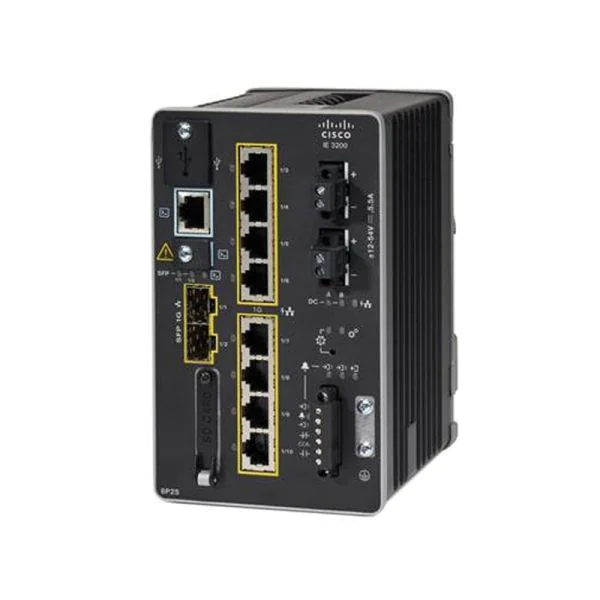
The Cisco IE-3200-8P2S-E is a high-performance industrial Ethernet switch, purpose-built for industrial automation, transportation, utilities, and smart infrastructure. Part of the Cisco Industrial Ethernet 3200 Series, this switch combines enterprise-grade Cisco networking technology with ruggedized hardware designed to withstand harsh industrial environments.
With 8 Gigabit Ethernet ports and 2 SFP fiber uplinks, the IE-3200-8P2S-E is ideal for connecting PLCs, HMIs, IoT gateways, IP cameras, and other industrial devices. It delivers secure, deterministic, and scalable connectivity for both OT and IT networks, enabling organizations to build mission-critical industrial networks with ease.
Key Features and Highlights
8 × 10/100/1000 Mbps Ethernet ports with PoE support
2 × Gigabit SFP fiber uplinks for long-distance connectivity
Rugged DIN-rail mountable design for industrial environments
Extended temperature range and resistance to vibration, dust, and EMI
Layer 2 switching features including VLAN, QoS, and Rapid Spanning Tree Protocol (RSTP)
Advanced security with 802.1X authentication, ACLs, DHCP snooping, and ARP inspection
Deterministic forwarding for industrial automation and SCADA traffic
Industrial-Grade Design
The IE-3200-8P2S-E is engineered to operate reliably in harsh industrial conditions, where standard enterprise switches may fail.
Environmental Resilience
Extended operating temperature range (-40°C to +75°C)
Resistant to vibration and shock, ideal for factory and transportation installations
Electromagnetic interference (EMI) protection for electrical-heavy environments
Fanless design for silent, maintenance-free operation
This rugged design ensures continuous operation in mission-critical industrial applications.
Port Configuration and Connectivity
Copper Ports
8 × Gigabit Ethernet RJ45 ports, supporting auto-negotiation and auto-MDIX
PoE support allows IP cameras, sensors, and wireless access points to operate without separate power lines
Fiber Uplinks
2 × Gigabit SFP ports for multi-mode or single-mode fiber
Ideal for long-distance backbone connections or connecting multiple industrial sites
This combination provides flexible deployment options, whether connecting devices within a factory or linking to remote network segments.
Layer 2 Switching Features
The IE-3200-8P2S-E provides advanced Layer 2 features essential for industrial and enterprise networks:
VLAN segmentation for traffic isolation
QoS (Quality of Service) for prioritizing critical traffic such as PLC data, IP cameras, or VoIP
Rapid Spanning Tree Protocol (RSTP) for fast network convergence
Link aggregation for bandwidth redundancy
IGMP Snooping for efficient multicast traffic handling
These features ensure deterministic and reliable network performance, which is critical for time-sensitive industrial applications.
Cisco IE-3200-8P2S-E – Rugged Industrial Ethernet Switch for High-Performance Networks
Security Features
Industrial networks must be secure, and the IE-3200-8P2S-E offers enterprise-grade security adapted for OT environments:
IEEE 802.1X port-based authentication to prevent unauthorized device access
Access Control Lists (ACLs) for traffic filtering
DHCP snooping to block rogue DHCP servers
ARP inspection to prevent spoofing attacks
Port security to limit MAC addresses per port
These features help protect critical infrastructure from cyber threats while maintaining operational continuity.
Typical Deployment Scenarios
1. Factory Automation
Connect PLCs, HMIs, industrial PCs, and IoT devices
VLAN segmentation ensures data isolation between production lines
PoE support powers cameras and access points on the factory floor
2. Utilities and Substations
High EMI tolerance for electrical substations and utility control networks
Fiber uplinks for remote monitoring and control
Redundant topologies with RSTP ensure high availability
3. Transportation Systems
Traffic signal controllers, roadside cabinets, and rail networks
VLANs for traffic, video surveillance, and management
PoE support for IP cameras and sensors
4. Smart Cities
Street cameras, public Wi-Fi access points, and IoT sensors
Fiber backbone connections between multiple urban nodes
QoS and VLANs maintain critical service traffic
Operational Reliability
Cisco industrial switches, including the IE-3200-8P2S-E, are known for long lifecycle and stability.
10–15 year operational lifespan in industrial settings
Predictable firmware updates and security patches
Centralized management with Cisco tools for simplified monitoring and maintenance
This reduces total cost of ownership (TCO) while ensuring continuous uptime.
Deployment Best Practices
Pre-Deployment
Survey environment for coverage and interference
Calculate PoE requirements for connected devices
Plan VLANs for traffic segregation (CCTV, IoT, corporate networks)
Plan redundancy using RSTP and link aggregation
Installation
DIN-rail mount for compact industrial panels
Connect devices to copper ports or fiber uplinks
Configure VLANs, QoS, and security features
Test connectivity and signal strength
Maintenance
Monitor network traffic and connected clients
Apply firmware and security updates regularly
Inspect ports and hardware for wear in harsh environments
Test failover and redundancy periodically
Cisco IE-3200-8P2S-E – Rugged Industrial Ethernet Switch for High-Performance Networks
Frequently Asked Questions (FAQ)
1. What is the IE-3200-8P2S-E designed for?
Rugged industrial networks requiring high reliability, PoE, and long-term support in factories, transportation, and smart infrastructure.
2. How many devices can it support?
Up to 8 devices per copper port, with additional uplinks for backbone connectivity.
3. Does it support PoE?
Yes, all 8 copper ports support PoE to power devices such as IP cameras or wireless APs.
4. Can it operate in extreme temperatures?
Yes, from -40°C to +75°C, suitable for harsh industrial environments.
5. How is security handled?
Supports 802.1X, ACLs, DHCP snooping, ARP inspection, and port security to protect OT and IT networks.
6. Can it integrate with existing Cisco networks?
Yes. Seamless integration with Cisco IE series switches, routers, and controllers.
7. What fiber modules are compatible?
Supports single-mode and multi-mode SFP fiber modules.
8. Is it suitable for CCTV and surveillance?
Yes. PoE ports can power cameras, and VLAN/QoS ensures smooth video traffic.
9. Can multiple switches be deployed together?
Yes. Supports RSTP and link aggregation for redundant topologies.
10. How long is the expected lifespan?
Typically 10–15 years with proper monitoring and maintenance.
SEO & Buyer Keywords
Cisco IE-3200-8P2S-E
Cisco industrial Ethernet switch
Industrial PoE switch
Rugged industrial switch
Layer 2 industrial switch
PoE switch for IP cameras
Industrial automation network switch
IE-3200 series switch Singapore
Fiber uplink industrial switch
Example Meta Description
“Cisco IE-3200-8P2S-E industrial Ethernet switch with 8 Gigabit ports and 2 SFP uplinks. Rugged, PoE-enabled, secure Layer 2 switch for industrial automation, CCTV, and smart city networks.”
Cisco IE-3200-8P2S-E – Extended Industrial Deployment, Installation & Optimization Guide
Step-by-Step Installation Guide
1. Mounting the Switch
DIN-Rail Installation: Secure the switch onto a DIN rail in your industrial cabinet or control panel.
Wall or Rack Mounting: Use optional brackets for wall mounting in server rooms or factory floors.
Ensure the environment is free from excessive dust or vibration.
2. Powering the Device
Connect to a PoE injector or PoE switch for powering connected devices.
If using external power, confirm voltage and polarity match specifications.
Check LEDs for power status (green = operational, amber = warning).
3. Network Configuration
Access the switch web interface or CLI for initial setup.
Assign IP addresses, subnet masks, and gateway for network integration.
Configure VLANs for separation of traffic (e.g., CCTV, IoT, corporate).
Enable QoS for critical devices like cameras, sensors, or PLCs.
4. Fiber Uplink Setup
Insert compatible SFP modules (single-mode or multi-mode) into the SFP ports.
Connect fiber cables to core switches or remote network segments.
Test connectivity and throughput.
5. Security Configuration
Enable 802.1X port authentication to prevent unauthorized device access.
Configure ACLs for traffic filtering and network segmentation.
Enable DHCP snooping and ARP inspection for network security.
Set port security limits for industrial devices.
6. Testing and Verification
Use ping and traceroute to test connectivity.
Check PoE status to ensure connected devices are powered correctly.
Verify VLAN configuration and QoS traffic prioritization.
Monitor for packet loss or latency, especially for time-sensitive traffic.
Extended Industrial Deployment Guidelines
Factory Automation
Place switches near PLC racks or IoT gateways for minimal cabling.
Use PoE ports to power sensors, cameras, and wireless APs.
Segment production line traffic using VLANs to avoid data collisions.
Enable QoS for deterministic traffic in SCADA or real-time control networks.
CCTV & Surveillance
Connect IP cameras to PoE ports directly.
Use VLANs to separate video traffic from enterprise or IoT networks.
Fiber uplinks can connect multiple cabinets or buildings for centralized NVR access.
QoS ensures smooth video streaming without packet loss.
Smart City Networks
Deploy IE-3200-8P2S-E switches in street cabinets or outdoor enclosures.
Use fiber uplinks for connecting multiple nodes.
Segment traffic for public Wi-Fi, cameras, and IoT devices using VLANs.
Redundant topology ensures network continuity during fiber or link failure.
Transportation Networks
Railways, traffic control, and port automation benefit from rugged design and extended temperature operation.
VLAN segmentation ensures separation of control, video, and administrative traffic.
Enable RSTP for fast convergence in redundant networks.
Troubleshooting Tips
No connectivity on a port
Verify port status LEDs
Confirm PoE is supplying power (if applicable)
Check VLAN and ACL configuration
Slow network or high latency
Inspect bandwidth usage per port
Verify QoS settings for priority traffic
Check for link errors or duplex mismatches
Intermittent connectivity
Examine fiber uplink for loose connections
Test cable quality and replace if necessary
Check for EMI interference in industrial environment
PoE devices not powering
Confirm switch PoE budget is sufficient
Test connected device for proper power consumption
Check port configuration and enable PoE if disabled
VLAN traffic not reaching destination
Verify VLAN ID and tagging configuration
Check trunk and access port settings
Inspect connected switches for consistent VLAN configuration
Extended FAQ Section
1. What is the difference between IE-3200-8P2S-E and other IE-3200 models?
The IE-3200-8P2S-E offers 8 PoE Ethernet ports and 2 fiber uplinks, optimized for industrial and harsh environments, unlike non-PoE or smaller-port variants.
2. Can it operate in extreme temperatures?
Yes, from -40°C to +75°C, making it suitable for outdoor and factory deployments.
3. How many devices can each switch support?
Supports 8 devices on PoE ports, with fiber uplinks for connecting additional devices or switches.
4. Is the switch suitable for high EMI environments?
Yes, it is designed with EMI protection, ideal for factories, substations, or transportation hubs.
5. How is redundancy implemented?
Supports Rapid Spanning Tree Protocol (RSTP) and link aggregation to provide network failover and minimize downtime.
6. Can it power IP cameras or wireless APs?
Yes, PoE ports provide power directly to connected devices, reducing cabling complexity.
7. What management options are available?
Web-based GUI
CLI (Command Line Interface)
SNMP for centralized monitoring
Cisco network management tools for enterprise and industrial deployments
8. What security protocols are supported?
IEEE 802.1X authentication
ACLs for traffic filtering
DHCP snooping and ARP inspection
Port security for device-level control
9. Can the IE-3200-8P2S-E integrate with Cisco Industrial Wireless Access Points?
Yes, it integrates seamlessly with Cisco industrial APs like MR 28-HW for complete wired and wireless industrial network solutions.
10. What industries benefit most from this switch?
Manufacturing and automation
Transportation and logistics
Utilities and power distribution
Smart city infrastructure
Industrial IoT networks
Cisco IE-3200-8P2S-E – Real-World Industrial Case Studies and Advanced Deployment Guide
Case Study 1: Factory Automation Deployment
Scenario:
A large automotive assembly plant needed reliable connectivity for PLCs, HMIs, IoT sensors, and IP cameras across multiple production lines.Deployment Highlights:
10 Cisco IE-3200-8P2S-E switches installed on DIN rails across control cabinets.
PoE ports powering 20 IP cameras and wireless APs.
VLANs configured to separate PLC traffic, camera traffic, and corporate network traffic.
Fiber uplinks connecting each production floor to the central data center.
RSTP enabled for fast failover in case of a switch failure.
Outcome:
Zero downtime for production automation networks.
High-quality video streaming from all cameras.
Simplified maintenance with centralized monitoring via SNMP.
Industrial Deployment Best Practices (Advanced)
1. Pre-Deployment Planning
Before installation, carefully plan your industrial network:
Site Survey
Identify environmental hazards: dust, moisture, vibration, temperature extremes.
Map device locations: PLCs, HMIs, IoT sensors, CCTV cameras, and wireless APs.
Identify fiber backhaul paths for long-distance connectivity.
PoE Budgeting
Calculate total PoE requirements: cameras, APs, and sensors.
Ensure the IE-3200-8P2S-E switch PoE budget covers all connected devices.
Consider surge protection if powering outdoor devices.
VLAN & QoS Planning
Separate traffic types: IoT, CCTV, factory automation, and corporate networks.
Prioritize latency-sensitive traffic with QoS, especially for SCADA, PLC, and video streams.
Redundancy & Topology Planning
Decide between star, ring, or mesh topologies depending on reliability needs.
Use RSTP or link aggregation for fast failover and zero downtime.
2. Installation Workflow
Mounting & Environmental Setup
DIN rail or wall/rack mounting depending on your cabinet or server room.
Ensure proper airflow and vibration isolation.
Power & PoE Connections
Connect to PoE-enabled devices (IP cameras, wireless APs).
Use surge protectors for outdoor PoE connections.
Copper & Fiber Connections
Connect 8 copper ports for end devices.
Use SFP uplinks to connect to the core network or other switches.
Network Configuration
Assign IP addresses, subnet masks, and gateway.
Configure VLANs and trunk ports.
Enable QoS for critical traffic.
Apply 802.1X authentication and ACLs for security.
Testing & Verification
Ping and traceroute to confirm connectivity.
Check PoE status and ensure devices are powered.
Test failover with RSTP enabled.
Verify VLAN isolation and QoS prioritization.
3. PoE Planning Guide
Device Type Quantity Power per Device (W) Total Power (W) Notes IP Camera 10 10 100 PoE ports can handle cameras directly Wireless AP 5 12.5 62.5 Ensure PoE budget covers all APs IoT Sensor Gateway 3 8 24 Use PoE if APs or sensors are remote Total PoE Budget 186.5 Confirm switch supports ≥ 190W PoE Tips:
Always leave ~20% overhead for future devices.
Consider using multiple IE-3200-8P2S-E switches for large deployments.
Fiber uplinks do not consume PoE budget.
Case Study 2: Smart City Surveillance Network
Scenario:
A city government required high-density wireless and wired connectivity for street cameras, traffic sensors, and public Wi-Fi hotspots.Deployment Highlights:
Multiple IE-3200-8P2S-E switches installed in street cabinets.
Fiber uplinks connected cabinets to the municipal data center.
VLANs separated CCTV traffic, IoT sensor traffic, and public Wi-Fi traffic.
PoE used to power cameras and small APs mounted on poles.
Redundant network topology with RSTP to prevent service interruption.
Outcome:
Continuous surveillance without video loss.
Segmented networks prevent unauthorized access to public Wi-Fi.
Easy maintenance with remote monitoring and firmware updates.
Case Study 3: Transportation Network – Railway Signaling
Scenario:
A railway operator required reliable Ethernet connectivity for signaling equipment, sensors, and CCTV across stations.Deployment Highlights:
IE-3200-8P2S-E switches installed in station cabinets.
PoE powering IP cameras and wireless access points.
Fiber uplinks connecting stations to central control.
VLANs created for signaling, surveillance, and administrative networks.
RSTP ensures fast recovery if a link fails.
Outcome:
Reliable and deterministic network for safety-critical applications.
High-quality video surveillance across stations.
Easy integration with existing Cisco industrial network infrastructure.
Recommended Industrial Deployment Topologies
1. Star Topology
Centralized core switch connects to IE-3200-8P2S-E switches in individual cabinets.
Simple configuration and monitoring.
Suitable for small factories or office networks.
2. Ring Topology
Switches connected in a loop with RSTP enabled.
Provides redundancy and fast failover.
Ideal for mission-critical industrial networks.
3. Mesh Topology
Multiple switches interconnect for maximum coverage and redundancy.
Supports large smart city or transportation networks.
Cisco IE-3200-8P2S-E – Rugged Industrial Ethernet Switch for High-Performance Networks
Optimization Tips for Cisco IE-3200-8P2S-E
Use VLANs to segment traffic by type: PLC, CCTV, IoT, or enterprise.
Enable QoS for latency-sensitive traffic, such as IP cameras or SCADA systems.
PoE budget planning ensures all connected devices receive sufficient power.
RSTP configuration provides network redundancy and prevents downtime.
Monitor traffic with SNMP or Cisco management tools for performance optimization.
Regular firmware updates enhance security and stability.
Periodic site surveys for interference detection and signal optimization.
Extended FAQ – Advanced Section
1. Can IE-3200-8P2S-E support multiple VLANs simultaneously?
Yes. Multiple VLANs can be configured for traffic isolation between IoT, CCTV, and enterprise networks.
2. How many PoE devices can it support?
All 8 copper ports support PoE. The maximum number depends on total PoE budget and connected device requirements.
3. Is fiber uplink mandatory?
No, fiber uplinks are optional but recommended for long-distance connections or connecting multiple buildings.
4. Can it integrate with Cisco wireless APs?
Yes. It works seamlessly with Cisco industrial APs like MR 28-HW for complete wired and wireless network solutions.
5. Can the switch operate in outdoor cabinets?
Yes, if placed in weatherproof enclosures. Its extended temperature and EMI tolerance ensure reliable outdoor operation.
6. How does it handle network redundancy?
Supports RSTP and link aggregation for fast failover in case of link or device failure.
7. Can it be managed centrally?
Yes. Options include:
SNMP monitoring
Cisco network management software
Web-based GUI for individual switch configuration
8. What industries benefit the most?
Manufacturing & factory automation
Transportation & railway networks
Utilities & power distribution
Smart city & IoT deployments
CCTV & surveillance networks
Buy Cisco IE-3200-8P2S-E in Singapore – Choicecycle (SGCCTV)
For authentic Cisco IE-3200-8P2S-E switches, expert advice, and local support, contact:

📍 Store Location: Sim Lim Square #02-81, Singapore
🕒 Operating Hours: 11 AM – 8 PM
📞 WhatsApp: +65 9853 4404
📧 Email: [email protected]
🌐 Website: https://sgcctv.biz
Choicecycle supplies Cisco IE-3200-8P2S-E switches for factory automation, transportation, utilities, CCTV, and IoT networks across Singapore.


Nunc lacus elit, faucibus ac laoreet sed, dapibus ac mi. Maecenas eu ante a elit tempus fermentum. Aliquam commodo tincidunt semper. Phasellus accumsan, justo ac mollis pharetra, ex dui pharetra nisl, a scelerisque ipsum nulla ac sem. Cras eu risus urna. Duis lorem sapien, congue eget nisl sit amet, rutrum faucibus elit.
Donec accumsan auctor iaculis. Sed suscipit arcu ligula, at egestas magna molestie a. Proin ac ex maximus, ultrices justo eget, sodales orci. Aliquam egestas libero ac turpis pharetra, in vehicula lacus scelerisque. Vestibulum ut sem laoreet, feugiat tellus at, hendrerit arcu.
Nunc lacus elit, faucibus ac laoreet sed, dapibus ac mi. Maecenas eu ante a elit tempus fermentum. Aliquam commodo tincidunt semper. Phasellus accumsan, justo ac mollis pharetra, ex dui pharetra nisl, a scelerisque ipsum nulla ac sem. Cras eu risus urna. Duis lorem sapien, congue eget nisl sit amet, rutrum faucibus elit.