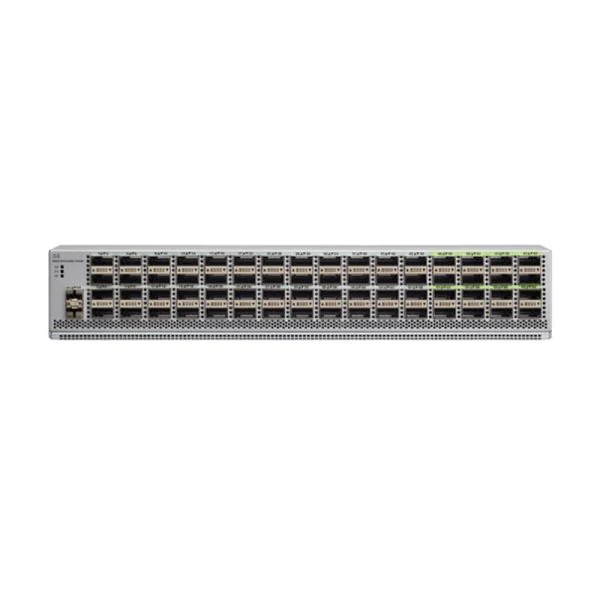
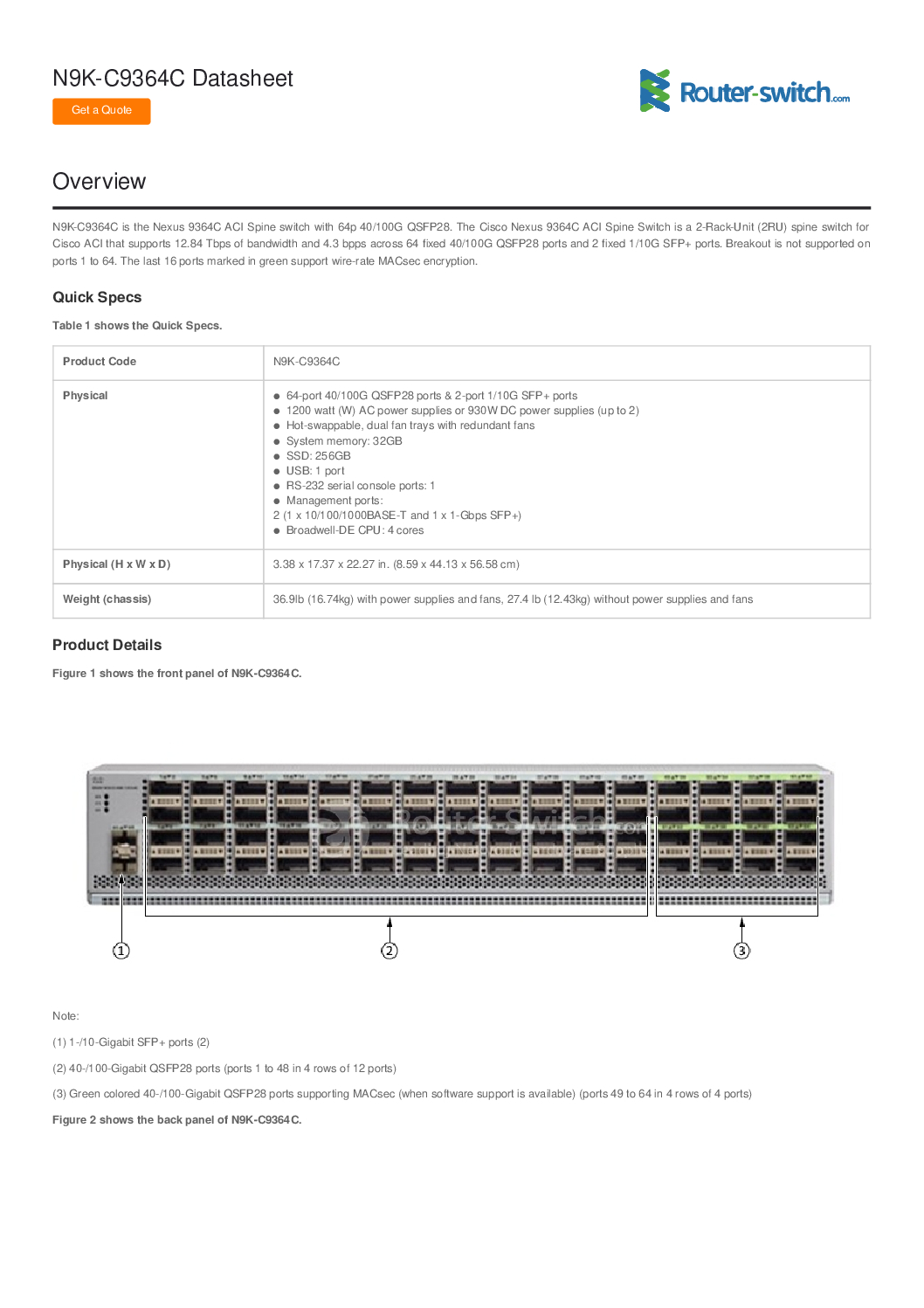
Cisco Nexus N9K-C9364C-GX – High-Performance Data Center Switch
The Cisco Nexus N9K-C9364C-GX is a high-performance, low-latency, 1/10/25/40/100G-capable data center switch designed to meet the demanding requirements of modern enterprise networks, cloud environments, and high-performance computing applications. As part of the Cisco Nexus 9000 Series, this switch provides flexible connectivity, advanced automation capabilities, and unparalleled reliability, making it ideal for data centers, service providers, and large-scale IT infrastructures.
Overview of Cisco N9K-C9364C-GX
The N9K-C9364C-GX is engineered for high-density 100G and 40G connectivity, supporting modern workloads, SDN (Software-Defined Networking), and cloud-scale environments. With 48 fixed 40/100-Gbps QSFP28 ports, this switch delivers both high throughput and low latency, enabling businesses to run demanding applications such as virtualization, analytics, and hyperscale networking.
Key Highlights:
48 QSFP28 Ports: Supports 40G or 100G connections with high bandwidth.
High Throughput: 7.68 Tbps switching capacity for ultra-fast data processing.
Low Latency: Sub-microsecond latency for high-performance applications.
Cisco NX-OS Software: Provides programmable, modular, and automated network management.
Data Center Focus: Optimized for spine-leaf architectures, multi-tenant environments, and SDN.
Key Features and Benefits
1. High-Density 100G Connectivity
48 QSFP28 ports allow flexible deployment of 40G or 100G links.
Ideal for aggregation or spine-leaf designs in large data centers.
Supports breakout mode for multiple lower-speed connections.
2. Ultra-Fast Switching Capacity
7.68 Tbps switching capacity ensures high-speed traffic handling.
Forwarding rate of 2.88 Bpps supports data-intensive workloads.
Reduces network bottlenecks for high-performance computing and cloud applications.
3. Advanced Software-Defined Networking (SDN)
Compatible with Cisco ACI (Application Centric Infrastructure) for automated network management.
Programmable network infrastructure with APIs for rapid deployment.
Supports VXLAN overlays and segment routing for modern data center designs.
4. Reliability and Redundancy
Dual redundant power supplies and fans ensure continuous operation.
High MTBF (Mean Time Between Failures) for mission-critical applications.
Supports hot-swappable components for minimal downtime.
5. Scalability and Flexibility
Perfect for large-scale enterprise and cloud environments.
Spine-leaf architecture compatibility allows easy horizontal scaling.
Supports multi-protocol traffic including Ethernet, Fibre Channel over Ethernet (FCoE), and IP storage.
6. Security and Network Segmentation
VXLAN and VRF-Lite support for multi-tenant network isolation.
Access control lists (ACLs) for secure data center connectivity.
Supports encryption and policy-based segmentation for sensitive workloads.
Technical Specifications
| Feature | Specification |
|---|---|
| Ports | 48 x QSFP28 (40/100G) |
| Switching Capacity | 7.68 Tbps |
| Forwarding Rate | 2.88 Bpps |
| Latency | Sub-microsecond |
| Software | Cisco NX-OS, ACI compatible |
| Power Supply | Dual-redundant, hot-swappable |
| Fans | Redundant, hot-swappable |
| Rack Units | 2 RU |
| Dimensions | 43.8 x 61.7 x 8.7 cm |
| Weight | ~25 kg |
| Management | CLI, NX-OS GUI, SNMP, REST API |
| Protocols Supported | Ethernet, VXLAN, FCoE, IP routing, MPLS |
Industrial and Enterprise Applications
1. Data Center Aggregation
Spine-leaf architecture for east-west traffic optimization.
High-speed connections for virtualization and cloud computing.
Ideal for hyperscale and enterprise-grade environments.
2. High-Performance Computing (HPC)
Low-latency, high-bandwidth switch for supercomputing clusters.
Supports parallel workloads, AI/ML, and big data analytics.
3. Cloud and Multi-Tenant Environments
VXLAN overlays allow secure, scalable multi-tenant deployments.
Supports dynamic provisioning and automated network segmentation.
4. Storage Networking
FCoE support allows integration of storage traffic over Ethernet.
High throughput ensures reliable data access for enterprise storage solutions.
Deployment and Configuration
Step 1: Rack and Power Installation
Install the N9K-C9364C-GX in a standard 19” data center rack (2 RU).
Connect dual redundant power supplies to independent circuits.
Step 2: Connect QSFP28 Ports
Use QSFP28 cables or modules for 40G/100G connections.
Configure breakout mode if multiple 10G/25G connections are required.
Step 3: Configure Network via NX-OS or ACI
Assign VLANs, VXLAN overlays, and VRFs.
Enable ACLs and QoS policies for traffic prioritization.
Integrate with Cisco ACI for automated deployment and monitoring.
Step 4: Test Connectivity and Redundancy
Verify uplinks and downlinks using ping tests and SNMP monitoring.
Check failover by simulating power or link loss.
Step 5: Monitoring and Maintenance
Use NX-OS CLI, GUI, or REST API for daily monitoring.
Schedule firmware updates during maintenance windows.
Document all port assignments, VLANs, and policies.
Comparison with Other Nexus 9000 Models
| Model | Ports | Switching Capacity | Use Case | Unique Feature |
|---|---|---|---|---|
| N9K-C9364C-GX | 48 QSFP28 | 7.68 Tbps | Spine/Leaf Data Centers | High-density 100G |
| N9K-C93180YC-EX | 48 x 10/25G + 6 x 40/100G | 3.6 Tbps | Leaf aggregation | Mixed 10/25/100G |
| N9K-C9336C-FX | 36 x 40/100G | 6.48 Tbps | Spine | High-capacity spine switch |
| N9K-C9372PX | 48 x 10G + 6 x 40G | 3.6 Tbps | Leaf/Top-of-Rack | PoE+ support |
✅ Why N9K-C9364C-GX Stands Out:
Higher port density for 100G applications.
Ultra-low latency for HPC and cloud workloads.
Seamless ACI integration for modern automated data centers.
Troubleshooting Guide
Port Link Issues
Check QSFP28 module compatibility.
Inspect cables and connectors for damage.
High Latency or Packet Loss
Verify VXLAN overlays or QoS configurations.
Check for network congestion or faulty modules.
Power or Fan Failure
Ensure redundant PSU and fans are connected.
Hot-swap defective components immediately.
ACI Integration Errors
Verify proper controller configuration.
Ensure firmware versions match supported ACI versions.
Maintenance Plan
Daily: Monitor system health and link status.
Monthly: Review logs, SNMP alerts, and CPU/memory usage.
Quarterly: Test failover of power and links.
Annually: Upgrade firmware, inspect cables, clean racks, and check airflow.
Real-World Use Cases
Cloud Provider Data Center: Supports massive multi-tenant networks with VXLAN overlays.
Enterprise HPC Cluster: Low-latency interconnect for AI and analytics workloads.
Financial Services: Handles ultra-low latency trading networks and high-volume transactions.
University or Research Labs: HPC clusters for simulations, big data, and AI experiments.
FAQs
Q1: Can N9K-C9364C-GX support 10G/25G connections?
A: Yes, via breakout mode on QSFP28 ports.
Q2: What is the max switching capacity?
A: 7.68 Tbps with 2.88 Bpps forwarding rate.
Q3: Does it support SDN?
A: Yes, fully compatible with Cisco ACI and NX-OS programmable APIs.
Q4: Is it suitable for HPC environments?
A: Yes, ultra-low latency and high bandwidth make it ideal.
Q5: How do I ensure high availability?
A: Use dual power supplies, redundant links, and hot-swappable modules.
Cisco Nexus N9K-C9364C-GX – The Ultimate Data Center Switch Guide
The Cisco Nexus N9K-C9364C-GX is designed for high-performance, low-latency, cloud-scale data center networks. Whether it’s enterprise, hyperscale cloud, or high-performance computing (HPC), this switch delivers 48 QSFP28 ports capable of 40/100G throughput with 7.68 Tbps switching capacity, making it one of the most versatile and powerful switches in the Cisco Nexus 9000 Series.
This guide will cover:
Technical specifications
Deployment strategies and spine-leaf architecture
Advanced performance optimization
Security best practices
Maintenance and troubleshooting
Real-world use cases
Buyer guidance and purchasing considerations
1. Detailed Technical Specifications
| Feature | Specification |
|---|---|
| Ports | 48 x QSFP28 (40G/100G) |
| Switching Capacity | 7.68 Tbps |
| Forwarding Rate | 2.88 Bpps |
| Latency | Sub-microsecond |
| Software | Cisco NX-OS, ACI compatible |
| Power Supply | Dual redundant, hot-swappable |
| Fans | Redundant, hot-swappable |
| Rack Units | 2 RU |
| Dimensions | 43.8 x 61.7 x 8.7 cm |
| Weight | ~25 kg |
| Management | CLI, NX-OS GUI, SNMP, REST API |
| Protocols Supported | Ethernet, VXLAN, FCoE, IP routing, MPLS |
Key Features in Detail:
48 QSFP28 Ports – Supports breakout mode to divide 100G links into 4x25G connections for flexible connectivity.
High Capacity & Low Latency – 7.68 Tbps throughput with 2.88 billion packets per second (Bpps) forwarding ensures ultra-low latency for HPC and financial trading networks.
Cisco NX-OS & ACI Compatibility – Fully programmable, supports SDN, automation, and seamless integration with Cisco Application Centric Infrastructure.
Redundant Hardware – Dual hot-swappable power supplies and fans minimize downtime.
2. Advanced Deployment Strategies
Spine-Leaf Architecture
The N9K-C9364C-GX is ideal for spine-leaf architecture in modern data centers:
Spine Layer: Acts as the backbone with 100G uplinks.
Leaf Layer: Connects servers, storage, and edge devices.
Example Design:
Deploy 4 x N9K-C9364C-GX switches as the spine.
Connect 16 leaf switches (N9K-C93180YC-EX) via 100G QSFP28 uplinks.
Use VXLAN overlay for multi-tenant networks and scalability.
Benefits:
Low-latency east-west traffic.
High availability and redundancy.
Scales horizontally for massive data center growth.
3. Performance Optimization
Port Utilization: Aggregate multiple links with port channels for higher throughput.
VXLAN & Overlay Networks: Efficiently segment traffic for multi-tenant environments.
QoS (Quality of Service): Prioritize latency-sensitive applications like HPC or VoIP.
Buffer Tuning: Adjust buffer sizes for large-scale workloads.
Monitoring & Analytics: Use SNMP, NX-OS telemetry, and ACI analytics for proactive performance monitoring.
4. Security Best Practices
VLAN Segmentation: Isolate tenants and applications.
Access Control Lists (ACLs): Restrict unauthorized traffic.
Role-Based Access Control (RBAC): Ensure only authorized personnel configure switches.
MACsec Encryption: Encrypt traffic for sensitive data.
Firmware Updates: Regularly update NX-OS for security patches.
5. Maintenance & Troubleshooting
Routine Checks:
Verify PSU and fan redundancy.
Monitor temperature and CPU/memory utilization.
Inspect port connectivity and errors.
Common Troubleshooting Scenarios:
QSFP28 Port Not Recognized:
Check module compatibility.
Reseat the module and test another port.
High Latency or Packet Drops:
Validate port channel configurations.
Review QoS policies.
ACI Integration Issues:
Confirm controller and switch software versions match.
Validate VXLAN overlay configuration.
Power Supply Failure:
Swap to redundant PSU.
Inspect AC/DC input voltage.
6. Real-World Use Cases
Enterprise Data Centers
Aggregates server traffic and storage.
Ensures low latency for virtualization and analytics workloads.
Hyperscale Cloud
Supports massive east-west traffic between compute nodes.
Enables automation through Cisco ACI for rapid tenant provisioning.
High-Performance Computing
Ideal for AI/ML clusters, simulations, and big data processing.
Low-latency, high-bandwidth connectivity between nodes.
Financial Services Networks
Ultra-low latency for trading networks.
High availability for mission-critical transactions.
7. Buyer Guidance
Network Size: N9K-C9364C-GX is ideal for medium to large data centers.
Traffic Requirements: High-density 100G connections for low-latency, high-throughput applications.
Scalability Needs: Supports spine-leaf and VXLAN architectures for future growth.
Redundancy Requirements: Dual PSU and hot-swappable components ensure continuous uptime.
8. FAQs
Q1: Can this switch support 10G and 25G connections?
A: Yes, via QSFP28 breakout mode.
Q2: What is the maximum switching capacity?
A: 7.68 Tbps with 2.88 Bpps forwarding.
Q3: Is the switch compatible with SDN?
A: Yes, fully compatible with Cisco ACI and programmable APIs.
Q4: Can it handle high-performance computing workloads?
A: Yes, ultra-low latency and high throughput make it ideal.
Q5: How is high availability ensured?
A: Redundant power, fans, and hot-swappable components, plus spine-leaf design support.
Cisco Nexus N9K-C9364C-GX – The Ultimate Data Center Switch Guide
The Cisco Nexus N9K-C9364C-GX is a high-performance, low-latency, data center switch designed for modern enterprise, hyperscale cloud, and high-performance computing (HPC) networks. With 48 QSFP28 ports, 7.68 Tbps switching capacity, and sub-microsecond latency, it is optimized for cloud, virtualization, storage, and mission-critical applications.
This guide covers:
Technical specifications
Deployment strategies & spine-leaf architecture
Step-by-step ACI integration
Performance benchmarking
Advanced troubleshooting & maintenance
Security best practices
Real-world case studies
Buyer guidance & purchase options
1. Technical Specifications – Deep Dive
| Feature | Specification |
|---|---|
| Ports | 48 x QSFP28 (40G/100G) |
| Switching Capacity | 7.68 Tbps |
| Forwarding Rate | 2.88 Bpps |
| Latency | < 1 microsecond |
| Software | Cisco NX-OS, ACI compatible |
| Power Supply | Dual redundant, hot-swappable |
| Fans | Redundant, hot-swappable |
| Rack Units | 2 RU |
| Dimensions | 43.8 x 61.7 x 8.7 cm |
| Weight | ~25 kg |
| Management | CLI, NX-OS GUI, SNMP, REST API |
| Protocols Supported | Ethernet, VXLAN, FCoE, IP Routing, MPLS |
Highlights:
48 QSFP28 Ports: Supports breakout mode for 4x25G per port.
Ultra-Low Latency: Ideal for HPC, financial trading, and AI workloads.
Cisco NX-OS & ACI: Enables SDN, automation, and policy-driven networks.
Redundant Components: Hot-swappable PSUs and fans for high availability.
2. Deployment Strategies
Spine-Leaf Architecture
The N9K-C9364C-GX excels in spine-leaf deployments:
Example Design:
Spine Layer: 4 x N9K-C9364C-GX switches.
Leaf Layer: 16 x N9K-C93180YC-EX switches connecting servers and storage.
VXLAN Overlay: Provides multi-tenant network segmentation.
L2/L3 Forwarding: Supports high-speed east-west traffic in data centers.
Benefits:
Low-latency connectivity
High throughput & scalability
Redundant paths for high availability
Deployment Diagram Description (for WordPress):
Spine switches at the top layer
Leaf switches below connected via 100G uplinks
Server racks connected to leaf switches via 10G/25G or 40G links
VXLAN overlays visualized with colored virtual tunnels
Step-by-Step Deployment
Step 1: Rack & Power Setup
Install switch in 19” rack (2RU).
Connect dual redundant power supplies to separate circuits.
Step 2: Port Connections
Connect QSFP28 uplinks to leaf/spine switches.
Configure breakout ports for multi-speed connections.
Step 3: Software Configuration
Assign VLANs, VXLAN overlays, and VRFs.
Configure ACLs, QoS policies, and monitoring.
Step 4: Testing & Validation
Ping all connected devices.
Simulate link or PSU failure to verify redundancy.
Use SNMP or NX-OS telemetry for traffic monitoring.
3. Cisco ACI Integration
Why ACI?
Cisco ACI allows policy-driven, automated networking, reducing configuration errors and deployment time.
Integration Steps:
Connect N9K-C9364C-GX switches to APIC controllers.
Configure leaf/spine roles in NX-OS.
Define Endpoint Groups (EPGs) for applications.
Apply QoS and security policies via ACI GUI.
Verify overlay VXLAN tunnels and L3 routing.
Advanced Tip: Use ACI Multi-Pod or Multi-Site architecture for geographic redundancy.
4. Performance Benchmarking
Throughput: 7.68 Tbps switching capacity
Forwarding Rate: 2.88 Bpps
Latency: Sub-microsecond
Supported Workloads:
HPC clusters
AI/ML training
Virtualized environments with >1,000 VMs per rack
Multi-tenant cloud deployments
Optimization:
Configure port channels to aggregate links.
Tune buffer sizes for large-scale traffic.
Enable QoS to prioritize critical workloads.
5. Security Best Practices
VLAN segmentation for isolation
ACLs to block unauthorized traffic
Role-Based Access Control (RBAC)
MACsec encryption for sensitive data
Regular NX-OS firmware updates
6. Maintenance & Troubleshooting
Routine Maintenance:
Monitor PSU/fan redundancy
Check temperature, CPU, memory
Inspect cables and QSFP modules
Troubleshooting Scenarios:
Port Not Recognized: Reseat QSFP module, verify compatibility
High Latency: Check port channels, QoS policies, buffer utilization
ACI Controller Errors: Ensure software versions match and VXLAN overlay is configured correctly
Power Failure: Switch to redundant PSU and inspect voltage
7. Real-World Case Studies
Hyperscale Cloud Provider
Spine: N9K-C9364C-GX
Leaf: N9K-C93180YC-EX
VXLAN overlays for multi-tenant cloud workloads
Result: 99.999% uptime and automated provisioning
Financial Services
Ultra-low latency trading network
Redundant spine-leaf design with dual PSU
FCoE for storage access
Result: Sub-microsecond latency, high reliability
University HPC Lab
AI/ML clusters and HPC simulations
N9K-C9364C-GX spine switches for high-speed interconnect
Result: Scalable network supporting thousands of VMs and nodes
8. Buyer Considerations
Scale: Ideal for medium-to-large data centers
Traffic: High-density 100G for HPC, cloud, or enterprise workloads
Redundancy: Dual PSU and hot-swappable fans
Scalability: Spine-leaf and VXLAN compatible
Management: Supports NX-OS CLI, GUI, SNMP, REST API
9. Extended FAQs
Q1: Can this switch support 10G or 25G endpoints?
A: Yes, breakout mode supports multi-speed connections.
Q2: Is it compatible with SDN/ACI?
A: Fully compatible, with programmable APIs and automation support.
Q3: Can it handle HPC workloads?
A: Yes, ultra-low latency and high throughput make it ideal.
Q4: How is high availability ensured?
A: Redundant power, fans, spine-leaf redundancy, and hot-swappable components.
Q5: How do I monitor performance?
A: Use NX-OS telemetry, SNMP, or Cisco ACI analytics dashboards.
Cisco Nexus N9K-C9364C-GX – The Complete Ultimate Data Center Switch Guide
The Cisco Nexus N9K-C9364C-GX is a high-density, high-performance, low-latency 40/100G switch designed for modern enterprise, hyperscale cloud, and high-performance computing (HPC) environments. Combining 48 QSFP28 ports, 7.68 Tbps switching capacity, sub-microsecond latency, and Cisco NX-OS/ACI integration, it provides unmatched performance, automation, and reliability for mission-critical workloads.
1. Technical Overview – Deep Dive
| Feature | Specification |
|---|---|
| Ports | 48 x QSFP28 (40/100G) |
| Switching Capacity | 7.68 Tbps |
| Forwarding Rate | 2.88 Bpps |
| Latency | < 1 microsecond |
| Software | NX-OS, ACI compatible |
| Power Supply | Dual redundant, hot-swappable |
| Fans | Redundant, hot-swappable |
| Rack Units | 2 RU |
| Dimensions | 43.8 x 61.7 x 8.7 cm |
| Weight | ~25 kg |
| Management | CLI, NX-OS GUI, SNMP, REST API |
| Protocols Supported | Ethernet, VXLAN, FCoE, IP Routing, MPLS |
Key Features & Benefits:
48 QSFP28 Ports – Flexible 40/100G connectivity with breakout mode.
Ultra-Low Latency – Ideal for HPC, AI/ML, financial trading, and cloud workloads.
ACI Integration – Automates data center policies and scaling.
Redundant Components – Dual PSU and fans ensure zero downtime.
High Scalability – Spine-leaf and multi-pod architecture ready.
2. Spine-Leaf Architecture – Deployment Examples
The N9K-C9364C-GX excels in spine-leaf topologies, providing low-latency and high-bandwidth connectivity.
Deployment Example 1 – Enterprise Data Center:
Spine Layer: 4 x N9K-C9364C-GX switches
Leaf Layer: 16 x N9K-C93180YC-EX switches connecting servers and storage
VXLAN overlay for multi-tenant environments
Benefits: High availability, low-latency east-west traffic
Deployment Example 2 – Multi-Site Cloud Environment:
Use multi-pod architecture
Spines connected across data centers with VXLAN EVPN overlays
Centralized ACI controller manages policies across sites
Benefits: Seamless multi-site expansion and disaster recovery
Diagram Description (WordPress-ready):
Spine switches at the top layer
Leaf switches beneath
Servers and storage racks connected to leaf
VXLAN tunnels highlighted with color-coded overlays
3. Step-by-Step Multi-Site ACI Deployment
Connect Spine Switches to APIC Controllers
Configure N9K-C9364C-GX switches as spine in ACI topology.
Configure Leaf Switch Roles
Assign leaf switches and connect endpoints (servers/storage).
Create Endpoint Groups (EPGs)
Group applications logically for policy enforcement.
Define Tenant & VRF
Segregate networks with tenants and VRFs for multi-site isolation.
Configure VXLAN Overlays
Enable overlays between pods for cross-site connectivity.
Apply QoS Policies
Prioritize latency-sensitive workloads like HPC or financial apps.
Enable Security Policies
ACLs, RBAC, MACsec encryption for sensitive workloads.
Monitor via ACI Dashboard
Check health, traffic, latency, and alerts.
Test Failover
Simulate spine or leaf failure; verify ACI automation reroutes traffic.
Document Deployment
Maintain topology diagrams, VLAN/EPG assignments, and overlay configs.
4. Performance Benchmarks
Switching Capacity: 7.68 Tbps
Forwarding Rate: 2.88 Bpps
Latency: <1 microsecond for 40/100G ports
Optimization Tips:
Use port channels to aggregate links
Tune buffers for high-traffic applications
Enable QoS for critical applications
Use NX-OS telemetry for proactive monitoring
5. Security Best Practices
Segmentation with VLANs & VXLAN
ACLs for traffic restriction
Role-Based Access Control (RBAC)
MACsec Encryption
Regular Firmware Updates
6. Maintenance & Troubleshooting – 10-Step Workflow
Monitor PSU and fan redundancy
Check CPU, memory, and temperature logs
Verify port connectivity and LED status
Inspect QSFP28 modules for proper seating
Check breakout configuration for 25/10G ports
Test link aggregation and port channels
Validate VXLAN overlays and routing tables
Review QoS policies for latency-sensitive traffic
Simulate failover scenarios
Document changes, configurations, and test results
7. Real-World Case Studies
Case Study 1 – Hyperscale Cloud Provider:
Spine: N9K-C9364C-GX
Leaf: N9K-C93180YC-EX
VXLAN overlays for multi-tenant cloud
Result: 99.999% uptime, automated provisioning
Case Study 2 – Financial Trading Network:
Ultra-low latency spine-leaf with redundant power
FCoE for storage access
Result: Sub-microsecond latency, high reliability
Case Study 3 – University HPC Cluster:
AI/ML and simulation workloads
Spine switches provide low-latency interconnect
Result: Supports thousands of VMs and compute nodes
8. Network Optimization Tips
Aggregate ports for maximum throughput
Prioritize workloads with QoS and traffic shaping
Use VXLAN overlays for multi-tenant segmentation
Regular firmware updates for performance and security
Monitor using NX-OS telemetry or ACI analytics
9. Buyer Guidance & Future-Proofing
Scale: Medium-to-large data centers
Traffic Needs: High-density 100G and multi-speed breakout
Redundancy: Dual PSU, hot-swappable fans, spine-leaf redundancy
Automation: Full ACI integration
Future-Proofing: Multi-pod, VXLAN, and SDN ready
10. FAQs – Extended
Q1: Can it support 10G or 25G endpoints?
A: Yes, breakout mode supports multiple lower-speed connections.
Q2: Is it SDN/ACI compatible?
A: Fully compatible, programmable via APIs.
Q3: Suitable for HPC?
A: Yes, ultra-low latency and high throughput.
Q4: How is high availability ensured?
A: Redundant PSUs, fans, spine-leaf redundancy, hot-swappable components.
Q5: How to monitor performance?
A: NX-OS telemetry, SNMP, and ACI analytics dashboards.

Why Buy from Choicecycle Singapore
For businesses in Singapore seeking the Cisco N9K-C9364C-GX, Choicecycle provides:
Authentic Cisco Nexus products
Expert guidance on data center network design
Installation, configuration, and support services
Contact Choicecycle:
WhatsApp: +65 9853 4404
Email: [email protected]
Website: https://sgcctv.biz
Store: Sim Lim Square #02-81, Singapore
Hours: 11 AM – 8 PM


Nunc lacus elit, faucibus ac laoreet sed, dapibus ac mi. Maecenas eu ante a elit tempus fermentum. Aliquam commodo tincidunt semper. Phasellus accumsan, justo ac mollis pharetra, ex dui pharetra nisl, a scelerisque ipsum nulla ac sem. Cras eu risus urna. Duis lorem sapien, congue eget nisl sit amet, rutrum faucibus elit.
Donec accumsan auctor iaculis. Sed suscipit arcu ligula, at egestas magna molestie a. Proin ac ex maximus, ultrices justo eget, sodales orci. Aliquam egestas libero ac turpis pharetra, in vehicula lacus scelerisque. Vestibulum ut sem laoreet, feugiat tellus at, hendrerit arcu.
Nunc lacus elit, faucibus ac laoreet sed, dapibus ac mi. Maecenas eu ante a elit tempus fermentum. Aliquam commodo tincidunt semper. Phasellus accumsan, justo ac mollis pharetra, ex dui pharetra nisl, a scelerisque ipsum nulla ac sem. Cras eu risus urna. Duis lorem sapien, congue eget nisl sit amet, rutrum faucibus elit.