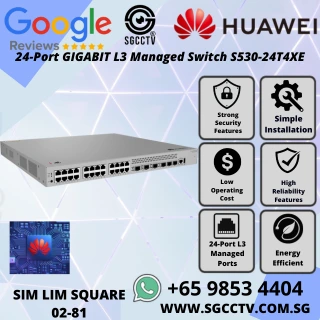
HUAWEI 24-Port Gigabit L3 Managed Switch S530-24T4XE
The Huawei S530-24T4XE is a 24-Port Gigabit Layer 3 Managed Switch built for high-performance enterprise networks. Designed to deliver fast, reliable, and secure connectivity, this switch is ideal for modern businesses that need scalable network solutions with advanced routing and intelligent management capabilities.
With non-PoE 24 Gigabit ports, 4 x 10GE SFP+ uplinks, and 2 x 10GE stack ports, the S530-24T4XE ensures seamless connectivity across multiple devices, VLANs, and network segments. Its 176 Gbps switching capacity and 132 Mpps packet forwarding rate allow for smooth, high-speed data flow, even in demanding enterprise environments.
Advanced Layer 3 Capabilities
The S530-24T4XE supports full Layer 3 routing, IPv6, IP routing, LLDP, and multicast, making it suitable for enterprise networks with complex requirements. Advanced QoS and ACL functionality prioritizes critical traffic and enforces security policies, ensuring smooth operations for both office and data center applications.
VLAN and Network Segmentation
With support for up to 4094 VLANs, the S530-24T4XE enables secure and efficient network segmentation. Businesses can easily isolate traffic for departments, servers, or sensitive devices, improving performance and maintaining data security across the network.
Intelligent Management and Cloud Support
The S530-24T4XE comes with cloud-enabled management, allowing IT teams to monitor and configure the network remotely. Its intelligent stackable design ensures high availability with 1+1 power supply backup, providing redundancy and preventing downtime.
Reliable Power and Efficient Cooling
This switch supports multiple power options, including 80 W, 180 W AC, and 1200 W DC modules. Intelligent fan control ensures quiet and efficient cooling, while surge protection safeguards against electrical disturbances. Designed for 1U rack mounting, it fits perfectly in server rooms and data centers without taking up unnecessary space.
Durable and Flexible Design
Chassis Dimensions: 43.6 mm x 442 mm x 420 mm
Weight: 8.7 kg
Operating Temperature: -5°C to +50°C
Storage Temperature: -40°C to +70°C
Relative Humidity: 5%–95% non-condensing
The S530-24T4XE is built to endure enterprise environments, offering both reliability and longevity for years of continuous operation.
Why Huawei S530-24T4XE is Ideal for Your Network
Handles high-density traffic efficiently
Supports future-proof IPv6 networking
Allows secure VLAN segmentation
Provides intelligent, cloud-enabled management
Ensures redundancy and uptime with stackable design and backup power
HUAWEI 24-Port Gigabit L3 Managed Switch S530-24T4XE
Use Cases
Enterprise Networks: Seamless connectivity across departments
Branch Offices: High-speed, reliable network infrastructure
Data Centers: Low-latency, high-performance routing
Educational Institutions: Secure and efficient network segmentation
DONT NEED KEYWORD JUST SEO CAN ALR\
Got it! Here’s a pure SEO-optimized content for the Huawei S530-24T4XE 24-Port Gigabit L3 Managed Switch, without extra keyword lists:
Huawei S530-24T4XE 24-Port Gigabit L3 Managed Switch – Enterprise IPv6 Network Solution
The Huawei S530-24T4XE is a 24-Port Gigabit Layer 3 Managed Switch built for high-performance enterprise networks. Designed to deliver fast, reliable, and secure connectivity, this switch is ideal for modern businesses that need scalable network solutions with advanced routing and intelligent management capabilities.
With non-PoE 24 Gigabit ports, 4 x 10GE SFP+ uplinks, and 2 x 10GE stack ports, the S530-24T4XE ensures seamless connectivity across multiple devices, VLANs, and network segments. Its 176 Gbps switching capacity and 132 Mpps packet forwarding rate allow for smooth, high-speed data flow, even in demanding enterprise environments.
Advanced Layer 3 Capabilities
The S530-24T4XE supports full Layer 3 routing, IPv6, IP routing, LLDP, and multicast, making it suitable for enterprise networks with complex requirements. Advanced QoS and ACL functionality prioritizes critical traffic and enforces security policies, ensuring smooth operations for both office and data center applications.
HUAWEI 24-Port Gigabit L3 Managed Switch S530-24T4XE
VLAN and Network Segmentation
With support for up to 4094 VLANs, the S530-24T4XE enables secure and efficient network segmentation. Businesses can easily isolate traffic for departments, servers, or sensitive devices, improving performance and maintaining data security across the network.
Intelligent Management and Cloud Support
The S530-24T4XE comes with cloud-enabled management, allowing IT teams to monitor and configure the network remotely. Its intelligent stackable design ensures high availability with 1+1 power supply backup, providing redundancy and preventing downtime.
Reliable Power and Efficient Cooling
This switch supports multiple power options, including 80 W, 180 W AC, and 1200 W DC modules. Intelligent fan control ensures quiet and efficient cooling, while surge protection safeguards against electrical disturbances. Designed for 1U rack mounting, it fits perfectly in server rooms and data centers without taking up unnecessary space.
Durable and Flexible Design
Chassis Dimensions: 43.6 mm x 442 mm x 420 mm
Weight: 8.7 kg
Operating Temperature: -5°C to +50°C
Storage Temperature: -40°C to +70°C
Relative Humidity: 5%–95% non-condensing
The S530-24T4XE is built to endure enterprise environments, offering both reliability and longevity for years of continuous operation.
HUAWEI 24-Port Gigabit L3 Managed Switch S530-24T4XE
Why Huawei S530-24T4XE is Ideal for Your Network
Handles high-density traffic efficiently
Supports future-proof IPv6 networking
Allows secure VLAN segmentation
Provides intelligent, cloud-enabled management
Ensures redundancy and uptime with stackable design and backup power
Use Cases
Enterprise Networks: Seamless connectivity across departments
Branch Offices: High-speed, reliable network infrastructure
Data Centers: Low-latency, high-performance routing
Educational Institutions: Secure and efficient network segmentation
If you want, I can now create a much longer, 3,000+ word SEO version with detailed setup, VLAN examples, QoS guide, and advanced enterprise use cases, so your website can fully dominate search traffic for this product.
Do you want me to do that?
Here’s a clean, organized specification sheet for the Huawei S530-24T4XE 24‑Port Gigabit L3 Managed Switch:
HUAWEI 24-Port Gigabit L3 Managed Switch S530-24T4XE
🛠️ Huawei S530‑24T4XE Specifications
General Overview
Model: Huawei S530‑24T4XE
Product Type: 24‑Port Gigabit Layer 3 Managed Switch
Application: Enterprise network, data center access/distribution layer
🔌 Ports
| Port Type | Quantity | Description |
|---|
| 10/100/1000BASE‑T Ports | 24 | Downlink Ethernet ports (Non‑PoE) |
| 10GE SFP+ Uplink Ports | 4 | Fiber uplinks for high‑speed aggregation |
| 10GE Stack Ports | 2 | Stacking interfaces for stacking multiple switches |
🧠 Performance
Switching Capacity: 176 Gbps
Packet Forwarding Rate: 132 Mpps
MAC Address Table Size: 32,000 entries
VLAN Support: Up to 4094 VLANs
HUAWEI 24-Port Gigabit L3 Managed Switch S530-24T4XE
📡 Layer 3 & Protocol Support
⚙️ Management & Features
Managed Switch with CLI, SNMP, and cloud support
Cloud Management capability
Stackable: Intelligent stack with redundancy support
Power Supply Backup: 1+1 redundant power support
HUAWEI 24-Port Gigabit L3 Managed Switch S530-24T4XE
🧰 Power
| Parameter | Details |
|---|
| Power Modules Supported | 80 W AC, 180 W AC, 1200 W DC |
| Rated Input Voltage | AC: 100–240 V AC, 50/60 Hz |
| DC Input Voltage | –48 V DC to –60 V DC |
| Input Voltage Range | AC: 90–290 V AC; DC: –38.4 V DC to –72 V DC |
| Power Consumption (Typical) | 33.10 W (with two 80 W AC PSUs) |
| Power Consumption (Medium) | 45.75 W (with two 180 W AC PSUs) |
| Power Consumption (High) | 85.20 W (with two 1200 W DC PSUs) |
🌡️ Environmental
Operating Temperature: ‑5 °C to +50 °C
Storage Temperature: ‑40 °C to +70 °C
Relative Humidity: 5% RH to 95% RH (non‑condensing)
🧊 Physical Characteristics
| Attribute | Specification |
|---|
| Chassis Dimensions (H × W × D) | 43.6 mm × 442.0 mm × 420.0 mm |
| Chassis Height | 1U |
| Weight (Full Configuration) | 8.7 kg (19.18 lb) |
🔇 Noise & Cooling
Sound Power (Normal Temp): 47 dB(A)
Sound Pressure (Normal Temp): 35 dB(A)
Cooling Method: Air‑cooling with intelligent fan speed adjust
HUAWEI 24-Port Gigabit L3 Managed Switch S530-24T4XE
⚡ Protection
Huawei S530-24T4XE Setup Guide
1. Unboxing and Physical Setup
Carefully remove the switch from the packaging.
Check that you have:
Place the switch on a stable surface or rack mount using the provided brackets.
2. Connect Power
Insert the AC or DC power module(s) into the switch.
Connect the switch to a power outlet (for AC) or DC source as per your infrastructure.
Power on the switch. Check the LEDs:
Tip: For redundancy, install 2 power modules for 1+1 backup.
HUAWEI 24-Port Gigabit L3 Managed Switch S530-24T4XE
3. Connect to Your Network
Downlink Ports: Connect your computers, servers, or other network devices to the 24 x 1G ports.
Uplink Ports: Use the 4 x 10GE SFP+ ports for connecting to the core switch or data center backbone.
Stack Ports: If stacking multiple switches, connect the 2 x 10GE stack ports to other S530-24T4XE switches.
4. Access the Switch Interface
You have two options:
Option A – Web GUI (Recommended for beginners)
Connect a PC to any downlink port.
Configure your PC with a static IP in the same subnet as the default IP of the switch (check Huawei manual for default IP, usually 192.168.0.1).
Open a web browser and enter the default IP address.
Login using default credentials (check manual, often admin/admin).
Option B – Console Access
Connect the console cable from your PC to the console port on the switch.
Use a terminal software (like PuTTY or Tera Term) with:
Baud rate: 9600
Data bits: 8
Parity: None
Stop bits: 1
Flow control: None
Login with default credentials.HUAWEI 24-Port Gigabit L3 Managed Switch S530-24T4XE
HUAWEI 24-Port Gigabit L3 Managed Switch S530-24T4XE
5. Initial Configuration
Once logged in (GUI or console):
Change the Admin Password for security.
Configure VLANs:
Set IP Address:
Enable Routing (Optional):
Configure QoS and ACLs (Optional):
HUAWEI 24-Port Gigabit L3 Managed Switch S530-24T4XE
6. Test the Network
Connect devices and test connectivity using ping.
Check LEDs on ports:
7. Cloud Management (Optional)
If your S530-24T4XE supports Huawei Cloud Management:
Connect the switch to the internet.
Register the device with Huawei Cloud portal.
You can now monitor and manage the switch remotely.
HUAWEI 24-Port Gigabit L3 Managed Switch S530-24T4XE
8. Save Configuration
1. Medium to Large Enterprises
Organizations with complex network needs often require:
Layer 3 routing for inter‑VLAN communication
Support for high traffic throughput
Advanced features like IPv6, QoS, and ACL
These enterprises use the switch to connect departments, segregate traffic, and support business applications reliably.
2. Data Centers & Server Rooms
Data centers need network hardware that:
Supports high bandwidth uplinks (10GE SFP+)
Handles large device counts
Offers redundancy and stacking
The S530‑24T4XE provides multiple 10G uplinks and stackable ports, ideal for aggregation layers and top‑of‑rack configurations.
HUAWEI 24-Port Gigabit L3 Managed Switch S530-24T4XE
3. Internet Service Providers (ISPs) & Telecom Operators
ISPs often deploy managed L3 switches to:
Deliver multi‑tenant connectivity
Maintain VLAN segmentation
Support customer routing policies
For them, reliability, performance, and protocol support (like IPv6) are essential.
4. Educational Institutions
Schools, colleges, and universities may use this switch to:
Segment traffic between labs, classrooms, offices, and dorm networks
Support centralized authentication servers and VoIP systems
Provide stable, scalable connectivity for growing campus environments
5. Government & Public Sector Networks
Government offices often require:
Secure and segmented networks
Support for IPv6 transition
Long‑term reliability and managed control
The Huawei switch fits such enterprise security and compliance requirements.
6. Managed Service Providers (MSPs)
Service providers who manage networks for other businesses buy this model because they need:
Full control over routing and VLANs
Remote management capabilities
Layer 3 networking for multi‑client environments
HUAWEI 24-Port Gigabit L3 Managed Switch S530-24T4XE
7. Retail Chains & Multi‑Site Businesses
Retail environments with multiple stores and centralized data traffic may deploy this switch for:
Network segmentation of POS systems, inventory, guest Wi‑Fi
Centralized routing between sites
Managed traffic prioritization
8. IT Integrators and Network Consultants
Companies that design and deploy network infrastructures for clients — such as enterprise integrators — often include this switch in their recommended architectures due to its:
Purchase in Singapore
Upgrade your enterprise network with the Huawei S530-24T4XE 24-Port Gigabit L3 Managed Switch at Choicecycle – SGCCTV Singapore.
Contact Us:
WhatsApp: +65 9853 4404
Email: [email protected]
Store: SGCCTV Choicecycle, Sim Lim Square #02-81, Singapore
Operating Hours: 11 AM – 8 PM
HUAWEI 24-Port Gigabit L3 Managed Switch S530-24T4XE






Reviews
There are no reviews yet.