


HUAWEI 48-Port Gigabit L2+ Managed Switch S310-48T4X DB
in stock
$898.00
HUAWEI SINGAPORE OFFICIAL PARTNER
Supply and Maintenance HUAWEI SWITCH Access Control System, Video Intercom.
Sim Lim Square 02-81 10am-7pm Daily.
Whatsapp Enquiry Project +65 98534404, Technical Support +65 81120788, Site Visit Maintenance +65 81985572.
in stock
HUAWEI 48-Port Gigabit L2+ Managed Switch S310-48T4X
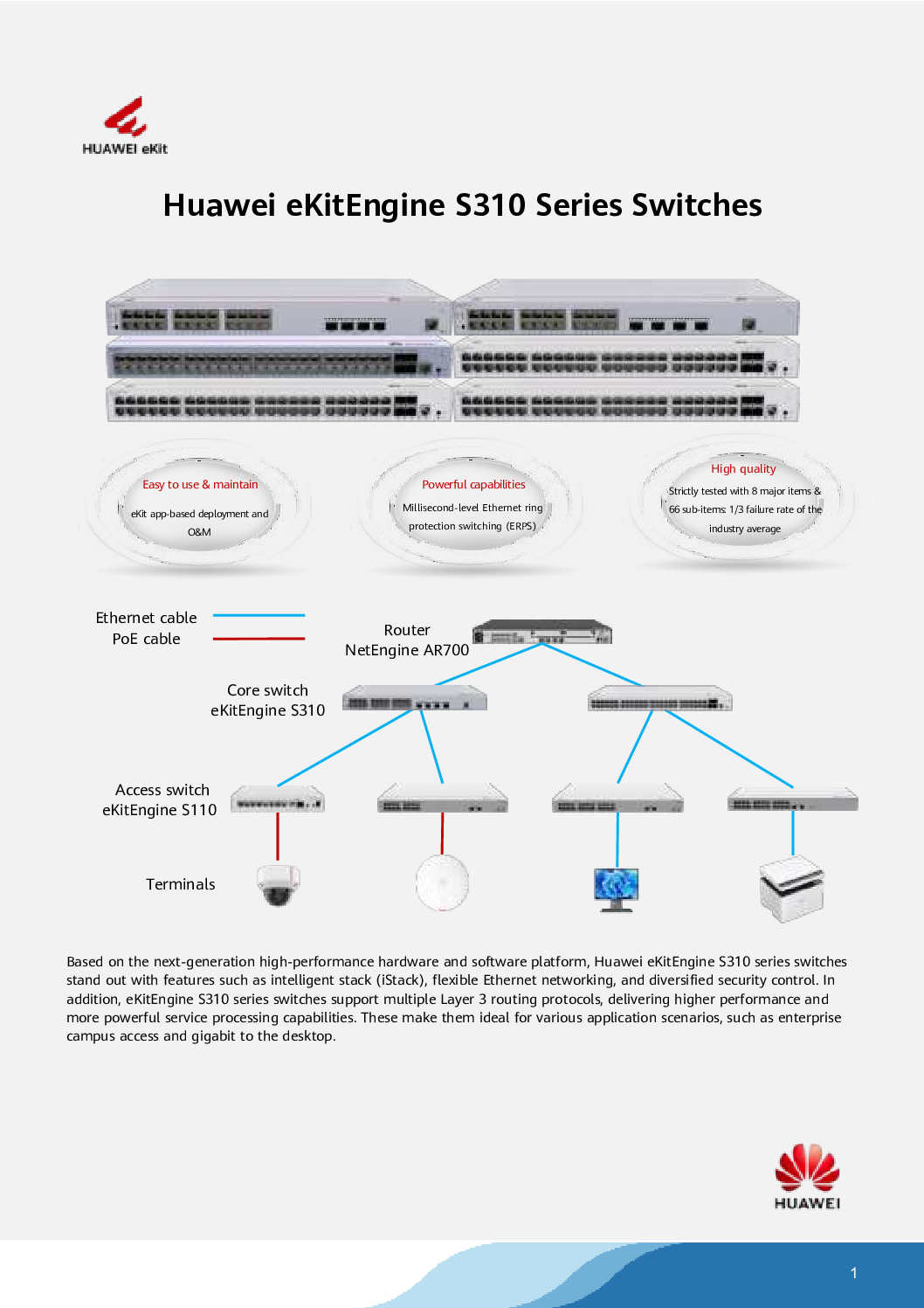
The Huawei S310-48T4X is a 48-Port Gigabit L2+ Managed Switch designed for enterprise networks, SMBs, and data centers. This VLAN managed, stackable Gigabit switch delivers high-speed connectivity, reliable performance, and flexible network management, making it ideal for modern businesses requiring secure and efficient network infrastructure.
Key Features of Huawei S310-48T4X
High-Performance 48-Port Gigabit Connectivity
48 x 10/100/1000BASE-T Ethernet ports for fast wired connections
Supports high-density connections for offices, campuses, or data centers
Ensures stable and reliable network performance for multiple devices simultaneously
Layer 2+ Managed Capabilities
VLAN support for network segmentation and enhanced security
QoS (Quality of Service) to prioritize traffic for critical applications
ACL (Access Control Lists) for access control and network protection
Efficient L2+ features for enterprise-level routing and traffic management
Stackable & Scalable
Supports stacking multiple switches for seamless network expansion
Simplifies management by treating stacked switches as a single logical unit
Reduces downtime and enhances network flexibility
Rackmount Design
1U rackmount chassis suitable for server rooms and network closets
Compact and space-saving design for high-density deployments
Enterprise-grade reliability and durability for continuous operation
Advanced Management
Centralized management via web GUI, CLI, or SNMP
Supports network monitoring, remote configuration, and troubleshooting
Simplifies IT operations for small to medium businesses
HUAWEI 48-Port Gigabit L2+ Managed Switch S310-48T4X
Specifications Overview
| Feature | Specification |
|---|---|
| Model | Huawei S310-48T4X |
| Ports | 48 x 10/100/1000BASE-T |
| Uplink | 4 x 10GE SFP+ ports |
| Layer | L2+ Managed Switch |
| VLANs | Up to 4094 VLANs |
| MAC Address Table | 32K entries |
| Switching Capacity | 176 Gbps |
| Packet Forwarding Rate | 132 Mpps |
| Stacking | Supported |
| Chassis | 1U Rackmount |
| Power | AC or DC modules, with optional redundancy |
Why Choose Huawei S310-48T4X?
Reliable Gigabit Performance: Supports high-speed connections for multiple devices.
VLAN and L2+ Features: Enables secure and segmented network infrastructure.
Stackable Design: Allows easy expansion and centralized management.
Enterprise-Grade Durability: Rackmountable and built for continuous operation.
Flexible Management Options: Web, CLI, and SNMP for easy monitoring and configuration.
HUAWEI 48-Port Gigabit L2+ Managed Switch S310-48T4X
Ideal Use Cases
Enterprise Networks: Connect multiple departments with secure VLANs.
Small to Medium Businesses: Scalable, stackable solution for growing networks.
Data Centers: High-density 48-port switch for servers and storage networks.
Educational Institutions: Campus-wide network segmentation and management.
Retail or Branch Offices: Centralized control and efficient traffic management.
🌟 Why Buy the Huawei S310‑48T4X 48‑Port Gigabit L2+ Managed Switch
The Huawei S310‑48T4X isn’t just another network switch — it’s a business‑ready, high‑performance networking solution designed to meet the demands of modern enterprise and SMB infrastructures. Here’s why it’s an excellent investment for your network:
✅ 1. High‑Capacity Gigabit Performance
With 48 Gigabit Ethernet ports, this switch provides reliable, high‑speed wired connectivity for workstations, servers, printers, IP phones, access points, and more. It’s ideal for environments that need consistent throughput without bottlenecks.
✅ 2. Advanced L2+ Managed Features
Beyond basic switching, the S310‑48T4X offers enhanced Layer 2+ capabilities such as:
VLAN support for network segmentation and security
QoS (Quality of Service) for traffic prioritization
ACL (Access Control Lists) for granular security control
These features give IT teams powerful control over traffic flows and network organization.
✅ 3. Scalable & Stackable for Growth
This model supports stacking, meaning multiple switches can be linked and managed as a single unit. That simplifies expansion, reduces management complexity, and helps grow your network smoothly without operational headaches.
HUAWEI 48-Port Gigabit L2+ Managed Switch S310-48T4X
✅ 4. Flexible Uplink Options
With 10GE SFP+ uplink ports, you can easily connect to high‑speed aggregation layers or core switches. This helps future‑proof your network as traffic demands increase.
✅ 5. Enterprise‑Grade Reliability
Built with:
Rackmount design (1U) for standard server cabinets
High performance under load
Strong hardware stability
This switch delivers years of dependable performance even in demanding network environments.
HUAWEI 48-Port Gigabit L2+ Managed Switch S310-48T4X
✅ 6. Easy Management & Monitoring
The S310‑48T4X simplifies network administration with:
Web GUI
CLI
SNMP support
This means both novice and advanced IT admins can configure, monitor, and troubleshoot easily.
✅ 7. Ideal for Multiple Use Cases
This switch fits perfectly across a range of environments, including:
✔ Enterprise office networks
✔ Branch offices and SMBs
✔ Educational campuses
✔ Data centers and server rooms
✔ Retail networks
✔ Hospitality and multi‑tenant buildings
HUAWEI 48-Port Gigabit L2+ Managed Switch S310-48T4X
✅ 8. Cost‑Effective Enterprise Solution
Compared to higher‑end core switches, the S310‑48T4X delivers enterprise‑grade performance at a more affordable level, making it a smart choice for budget‑conscious IT teams that still require professional networking features.
Huawei S310-48T4X Installation Guide
1. Unboxing and Physical Setup
Carefully remove the switch from the packaging.
Check that the package includes:
Huawei S310-48T4X switch
AC power module(s)
Rackmount brackets and screws
User manual
Optional console cable (RJ45)
Place the switch on a stable surface or install it in a standard 19-inch rack using the provided brackets.
Ensure proper airflow around the switch for cooling.
2. Connect Power
Insert the AC power module(s) into the switch.
Connect the power cord to a stable power outlet.
Power on the switch.
Verify that the Power LED is solid green and the fan LEDs indicate normal operation.
⚠ Tip: For redundancy, install two power modules (1+1 backup) if your model supports it.
3. Connect to Your Network
Use Cat5e or Cat6 cables to connect your network devices to the 48 Gigabit Ethernet ports.
For uplink to the core network or router, use the 4 x 10GE SFP+ uplink ports.
If stacking multiple S310 switches, use the stack ports to connect the switches in a stack configuration.
4. Access the Management Interface
The S310-48T4X can be configured via GUI, CLI, or SNMP.
Option A – Web GUI (Recommended)
Connect a computer to one of the switch’s ports.
Set the PC’s IP to the same subnet as the switch default IP (check manual, often 192.168.0.1).
Open a web browser and enter the switch’s IP address.
Login using default credentials (usually
admin/admin).
Option B – Console CLI
Connect the console cable from your PC to the console port on the switch.
Open terminal software (PuTTY, Tera Term) with these settings:
Baud rate: 9600
Data bits: 8
Parity: None
Stop bits: 1
Flow control: None
Login with default credentials.
5. Configure Basic Settings
Change Admin Password to secure the switch.
Set Management IP for remote access.
Configure VLANs:
Create VLANs for different departments or devices.
Assign ports to VLANs.
Configure Uplink and Stacking if using multiple switches.
6. Optional Advanced Configuration
Enable QoS to prioritize critical traffic.
Set ACLs for security and access control.
Enable SNMP or syslog for network monitoring.
Stack multiple switches for simplified management.
HUAWEI 48-Port Gigabit L2+ Managed Switch S310-48T4X
7. Test Your Network
Connect devices and check connectivity.
Ping devices to verify network reachability.
Observe LED indicators:
Green → active link
Blinking → traffic passing
Off or red → troubleshooting required
8. Save Configuration
After setup, always save the configuration to prevent loss on reboot:
GUI: System → Save
CLI:
savecommand
HUAWEI 48-Port Gigabit L2+ Managed Switch S310-48T4X
9. Maintenance Tips
Firmware Updates: Regularly update firmware for security and stability.
Monitor Network: Use the web GUI or SNMP to track traffic and device health.
Check Ports: Inspect cables and LEDs regularly.
Environment: Keep the switch away from extreme heat or moisture.
1. Hardware Design
The S310-48T4X is built as a high-performance, enterprise-grade managed switch. Its hardware is carefully engineered for reliability, scalability, and long-term operation.
a) Printed Circuit Board (PCB)
Central component of the switch where all chips are mounted.
Contains switching chips for processing Ethernet frames at high speed.
Includes memory (RAM and Flash) for firmware, VLAN tables, MAC tables, and QoS processing.
b) Network Ports
48 x Gigabit Ethernet ports for wired connections.
4 x 10GE SFP+ ports for uplinks to the core network.
Ports are integrated with high-quality PHY chips for signal integrity and reliability.
c) Power Components
AC or DC power modules, designed for redundancy and protection.
Surge protection and voltage regulation circuitry for stable operation.
d) Enclosure / Chassis
1U rackmount metal chassis designed for data center or office deployment.
Provides durability, heat dissipation, and protection against mechanical shocks.
Ventilation fans and airflow channels maintain optimal operating temperatures.
e) Cooling and Thermal Design
Intelligent fans adjust speed based on temperature and load.
Heat sinks are installed on high-power chips for long-term stability.
HUAWEI 48-Port Gigabit L2+ Managed Switch S310-48T4X
2. Firmware and Software
Embedded firmware manages all Layer 2+ functions: VLANs, QoS, ACLs, stacking, and management protocols.
Allows GUI, CLI, and SNMP management.
Supports stacking features and remote management for enterprise networks.
3. Assembly Process
PCB Fabrication: Copper traces and layers are printed to form the circuitry.
Component Soldering: Switch chips, memory, power modules, and network controllers are soldered with precision.
Firmware Installation: Firmware is loaded and tested for performance and stability.
Chassis Integration: PCB, ports, fans, and power modules are assembled into the 1U rackmount chassis.
Quality Assurance: Each switch undergoes rigorous tests:
Ethernet throughput and port functionality
VLAN, ACL, and QoS operations
Stack configuration testing
Power stability and surge protection
Heat and environmental stress tests
Packaging: Brackets, cables, manuals, and accessories are added for shipment.
HUAWEI 48-Port Gigabit L2+ Managed Switch S310-48T4X
4. Materials Used
Chassis: Metal (steel or aluminum) for durability
PCB & Chips: Silicon, copper, and high-quality electronic materials
Fans & Heat Sinks: Aluminum and thermally conductive materials
Connectors & Ports: Gold-plated contacts for reliable Ethernet connections
1. Typical Operational Lifespan
8–12 years of reliable operation is expected under normal enterprise conditions.
Many S310-series switches can continue functioning beyond 10 years with proper maintenance.
2. Factors Affecting Lifespan
a) Environmental Conditions
Designed for indoor use in data centers, server rooms, or office racks.
Exposure to extreme temperatures, humidity, or dust can shorten lifespan.
Proper airflow and rack installation prolong longevity.
b) Power Quality
Stable AC or DC input ensures internal components operate safely.
Power surges or outages can reduce lifespan. Using UPS or surge protectors is recommended.
c) Usage Intensity
Continuous 24/7 operation is normal for enterprise switches and the S310-48T4X is built for this.
Heavy network traffic over many years may slightly accelerate component aging.
d) Firmware Updates & Maintenance
Regular firmware updates from Huawei ensure security and compatibility, which indirectly prolongs usable life.
Cleaning dust from fans and monitoring ports prevents overheating and mechanical wear.
HUAWEI 48-Port Gigabit L2+ Managed Switch S310-48T4X
3. Real-World Expectations
| Deployment Condition | Expected Lifespan |
|---|---|
| Optimal Environment (stable power, proper cooling) | 10–12 years |
| Typical Enterprise Deployment | 8–10 years |
| Harsh Environment (poor cooling, dusty, voltage fluctuations) | 6–8 years |
4. Signs It May Be Time to Replace
Reduced network performance despite proper configuration
Frequent reboots or hardware faults
Incompatibility with newer networking standards (e.g., higher speed uplinks or updated security protocols)
Excessive fan noise or overheating
HUAWEI 48-Port Gigabit L2+ Managed Switch S310-48T4X
Purchase Huawei S310-48T4X in Singapore
Upgrade your network infrastructure with the Huawei S310-48T4X 48-Port Gigabit L2+ Managed Switch for secure, high-performance, and scalable connectivity.
Contact Choicecycle – SGCCTV Singapore:
WhatsApp: +65 9853 4404
Email: [email protected]
Store: SGCCTV Choicecycle, Sim Lim Square #02-81, Singapore
Operating Hours: 11 AM – 8 PM


Nunc lacus elit, faucibus ac laoreet sed, dapibus ac mi. Maecenas eu ante a elit tempus fermentum. Aliquam commodo tincidunt semper. Phasellus accumsan, justo ac mollis pharetra, ex dui pharetra nisl, a scelerisque ipsum nulla ac sem. Cras eu risus urna. Duis lorem sapien, congue eget nisl sit amet, rutrum faucibus elit.
Donec accumsan auctor iaculis. Sed suscipit arcu ligula, at egestas magna molestie a. Proin ac ex maximus, ultrices justo eget, sodales orci. Aliquam egestas libero ac turpis pharetra, in vehicula lacus scelerisque. Vestibulum ut sem laoreet, feugiat tellus at, hendrerit arcu.
Nunc lacus elit, faucibus ac laoreet sed, dapibus ac mi. Maecenas eu ante a elit tempus fermentum. Aliquam commodo tincidunt semper. Phasellus accumsan, justo ac mollis pharetra, ex dui pharetra nisl, a scelerisque ipsum nulla ac sem. Cras eu risus urna. Duis lorem sapien, congue eget nisl sit amet, rutrum faucibus elit.
Reviews
There are no reviews yet.